Paying for NetSecWall with USDC or USDT
NetSecWall is paid in USDC or USDT on Base, Ethereum, Arbitrum, Optimism, Polygon, BNB Chain or Solana. Plans are yearly, orders are final, and your key arrives once the payment confirms.
NetSecWall for WindowsOn this page
You pay for NetSecWall with a stablecoin: USDC or USDT on Base, Ethereum, Arbitrum, Optimism, Polygon, BNB Chain or Solana. Pick a plan on the pricing page, enter your email, and you are sent to a secure crypto payment page to send the payment. When the network confirms it, your license key appears on screen and in your email. Plans are sold a year at a time, don't renew automatically, and crypto orders are final.
What you can pay with
| Coins | USDC or USDT |
| Networks | Base, Ethereum, Arbitrum, Optimism, Polygon, BNB Chain, Solana |
| Billing | Yearly, as a single payment |
| Renewal | Not automatic; you get an email before the license expires |
| Refunds | Crypto orders are final once the key is issued |
There is no card, PayPal or bank-transfer option at the moment. NetSecWall only accepts dollar stablecoins, so the amount you send matches the US dollar price on the pricing page.
How to pay with USDC or USDT
- Go to the pricing page and choose your plan. Which plan do I need? helps if you're unsure.
- On the checkout page, check the plan and enter the email address the key should go to. Cryptocurrency is shown as the payment method.
- Click Pay. You are taken to the crypto processor's secure payment page (XPTP).
- On that page, choose the coin and the network you want to pay from. The page shows the amount and the address to send it to.
- Send the payment from your wallet or exchange account, on exactly the network you chose.
- You return to NetSecWall's checkout, which says Payment received — confirming… once the transaction is seen, and then Payment confirmed with your license key.
- Copy the key and activate it in the app from Help ▸ Sign in to NetSecWall….
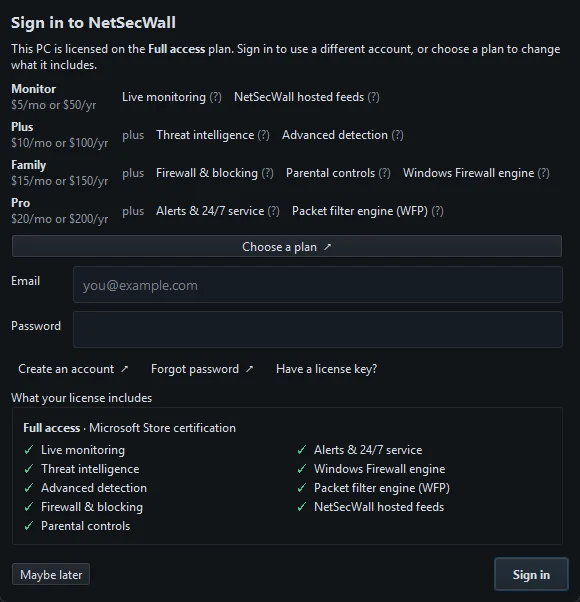
The key is also emailed to you when the payment clears, so closing the page early doesn't lose it. If the purchase created your NetSecWall account, the success page tells you, and a password is emailed to you as well.
Tips for a payment that goes through first time
- Send the full amount. If you pay from an exchange, its withdrawal fee may come out of what you send. Check that the amount arriving matches the amount on the payment page.
- Use the right network. USDC on Base and USDC on Ethereum are different things to a wallet. Send on the network you selected on the payment page, to the address it shows for that network.
- Pay before the order expires. An order is open for a limited time. If it expires first, start a new order rather than paying the old address.
- Wait for confirmations. Blockchains take anything from seconds to several minutes to confirm. Keep the checkout page open if you can; the key arrives by email either way.
A blockchain payment cannot be reversed. Double-check the network, the coin and the amount before you send. Crypto sent on the wrong network or to a wrong address may not be recoverable by anyone.
If something goes wrong
- "Your payment was short." Less than the order amount arrived, so no key was issued. Contact billing support with the order reference shown. Support will either complete the purchase or refund what arrived.
- "This order expired before a payment arrived." Start a new order. If you had already paid, don't pay again: contact support and quote the order reference.
- No email with your key. Check your spam folder. Your account page on netsecwall.com can send your keys again.
Order references look like NL-XXXXXXXXXX and appear on your receipt.
Renewals, receipts and refunds
A crypto payment buys one year. Nothing is stored to charge you again, and nothing will be. Before the license expires you get an email with a renewal link, which adds another year to the key you already have, so there is nothing to reactivate.
Receipts come from NetSecWall, which is the seller of record for crypto orders. The payment itself is public on the blockchain, as every on-chain transaction is. NetSecWall receives the order reference, plan, amount and your email, not your wallet address.
Because a crypto payment can't be reversed, orders are final once the key is issued. The exceptions: if NetSecWall is faulty and can't be fixed, or if your key was never issued, the payment is returned by hand in the coin you paid, minus network fees. The full terms are in the refund policy. That is why the 7-day free trial comes first: use it to make sure NetSecWall works on your PC before you pay.
Frequently asked questions
Can I pay for NetSecWall by card or PayPal?
Not at the moment. The only payment method is cryptocurrency: USDC or USDT on the networks listed above.
Can I pay monthly with crypto?
No. Plans are sold yearly as a single payment, because a monthly crypto payment would cost you a network fee every month.
How long does it take to get my license key?
Usually as long as the network takes to confirm the transaction, from seconds to a few minutes. The key appears on the checkout page and is emailed to you at the same time.
Does my plan renew automatically?
No. A crypto payment covers a fixed year. You get a reminder email before it expires, with a link to renew the same key.