Which plan do I need? Monitor, Plus, Family or Pro
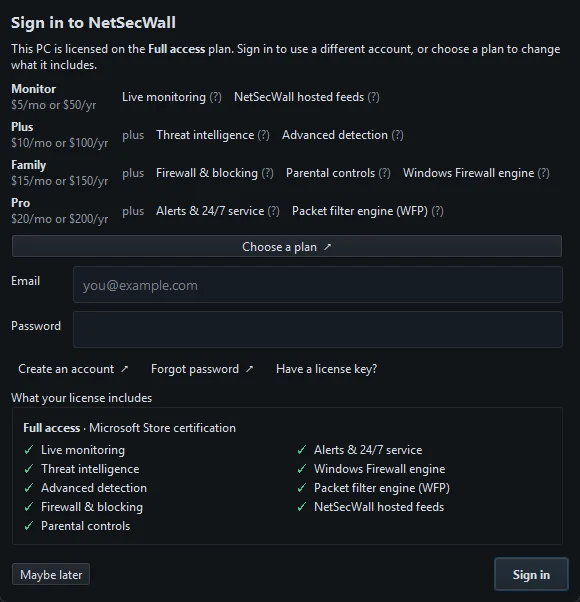
Monitor ($50/yr) shows what connects. Plus ($100/yr) adds threat intelligence and detection. Family ($150/yr) adds blocking and parental controls. Pro ($200/yr) adds the WFP engine and alerts.
NetSecWall for WindowsOn this page
- What each plan includes
- Which NetSecWall plan fits you
- Monitor: you want to see what your PC talks to
- Plus: you want to be warned about suspicious traffic
- Family: you want to block, or set limits for children
- Pro: you want everything, or you run another firewall manager
- Prices, billing and devices
- Enterprise is separate
Which NetSecWall plan you need depends on one question first: do you want to block things, or only see them? Monitor ($50 a year) and Plus ($100 a year) watch and warn but cannot block anything. Family ($150 a year) adds blocking and parental controls, and Pro ($200 a year) adds a second blocking engine plus phone and webhook alerts. Every plan starts with the same 7-day trial with everything unlocked, so you can try the lot before choosing.
What each plan includes
Each plan includes everything in the plan before it.
| Feature | Monitor | Plus | Family | Pro |
|---|---|---|---|---|
| Price per year | $50 | $100 | $150 | $200 |
| Live monitoring: Live, History, Relations, Events and DNS tabs | Yes | Yes | Yes | Yes |
| NetSecWall hosted feeds (lists and GeoIP from NetSecWall's servers) | Yes | Yes | Yes | Yes |
| Threat intelligence: the Threats tab and known-bad address lists | No | Yes | Yes | Yes |
| Advanced detection: the Detections and ATT&CK tabs | No | Yes | Yes | Yes |
| Firewall & blocking: apps, countries, categories, Learning mode, the Rules tab | No | No | Yes | Yes |
| Parental controls | No | No | Yes | Yes |
| Windows Firewall engine | No | No | Yes | Yes |
| Packet filter engine (WFP) | No | No | No | Yes |
| Alerts & 24/7 service: phone and webhook alerts | No | No | No | Yes |
Tabs your plan doesn't include stay visible but greyed out, with a tooltip saying what they do. The pricing page also lists the always-on background service under Pro's Alerts & 24/7 service.
Which NetSecWall plan fits you
Monitor: you want to see what your PC talks to
Every program with a connection, where it connects, how much it sends, and a searchable history of all of it. Monitor suits anyone who wants to understand their PC's traffic, for example to find what is using the connection in the background or which countries your apps talk to. It cannot block anything.
Plus: you want to be warned about suspicious traffic
Plus checks every address against public threat-intelligence lists and scores programs on 21 behavioral signals mapped to MITRE ATT&CK, such as a program checking in on a steady timer or a document opening a command shell. It tells you; it doesn't block. Choose it if you want the warnings and prefer to act on them yourself, and remember it is not an antivirus. See threat intelligence and detection.
Family: you want to block, or set limits for children
Family is the first plan that can block: an app with one click, a country, a website category, or everything at once, and Learning mode, which asks before a new program goes online. It includes parental controls: a content filter, an internet bedtime, a daily time limit and always-blocked apps, behind a password. It enforces through Windows Firewall. See parental controls: an overview.
Pro: you want everything, or you run another firewall manager
Pro adds the Packet filter (WFP) engine, NetSecWall's own filter in the Windows Filtering Platform, and Both engines together. That matters if another firewall manager already controls Windows Firewall: in Companion mode NetSecWall creates no Windows Firewall rules, so only the WFP engine can still block. Pro also adds phone alerts through ntfy and webhook alerts for when nobody is watching. See Windows Firewall rules or the WFP packet filter.
Prices, billing and devices
- Billed yearly. The app and some pages also show monthly figures ($5, $10, $15 and $20 a month), but only yearly plans can be bought today.
- Paid in cryptocurrency. USDC or USDT on several networks, a single payment for the year with no automatic renewal. Crypto orders are final, which is why the trial exists. See paying with USDC or USDT.
- Priced per device. A plan licenses the PC it is activated on.
- Introductory prices. These are launch prices; the current ones are always on the pricing page.
- No free tier. After the trial, NetSecWall locks until a plan is active.
Not sure between two plans? Use the trial to try the features the higher one adds. If you never block anything or set a parental control during the week, Monitor or Plus is probably enough.
Enterprise is separate
Organizations that want to manage NetSecWall across many PCs from their own server can use the NetSecWall Management Server. It is in beta, sold through sales rather than online, and priced by seats, from $299 a year for 25 seats, with every desktop feature on every seat. See the Enterprise page.
Frequently asked questions
Is there a free version of NetSecWall?
No. Every install gets a 7-day trial with everything unlocked, and after that a paid plan is needed. The Android app is a separate, free beta and is not on Google Play yet.
Can I pay monthly?
Not at the moment. Plans are sold a year at a time because payment is in cryptocurrency, where a monthly payment would cost you a network fee every month.
Can Monitor or Plus block an app?
No. Blocking of any kind, including Learning mode and parental controls, starts with the Family plan. Monitor and Plus show and warn only.
Does one plan cover several PCs?
Prices are per device. Each PC you want protected needs to be covered by a license.