License key errors and the lock screen
Every activation error says what went wrong: the key isn't recognized, it's been revoked or has expired, or the server couldn't be reached. Here's what each means and how to fix it.
NetSecWall for WindowsOn this page
A NetSecWall license key error always says what went wrong. The server doesn't recognize the key, the key has been revoked or has expired, or NetSecWall couldn't reach the server to check. The fix is usually quick: paste the key again straight from your email, renew, or connect to the internet and retry. If none of those apply, open a ticket.
You enter a key in Help ▸ Sign in to NetSecWall…. Click Have a license key?, paste it and click Activate key. See activating a license for the full walk-through.
What each NetSecWall license key error means
| Message | What it means | What to do |
|---|---|---|
| "Enter your license key." | The key box is empty. | Paste the key and try again. |
| "That key isn't recognized. Check it against your email and try again." | The server has no key matching what you entered. | Copy the whole NETSECWALL-… key from your purchase email and paste it. Capital letters and spaces at either end don't matter. |
| "That key has been revoked. Contact support." or "That key has been revoked: reason" | The key was disabled on the server. For example, a key used on more devices than it covers can be blocked. | Read the reason, then contact support. |
| "That key has expired. Renew it from your account." | The license term has ended. Crypto licenses don't renew themselves. | Renew from pricing. Plans are billed yearly. |
| "That key can't be used right now. Contact support." | The server refused the key for another reason. | Open a ticket. |
| "Couldn't reach the server. Check your connection and try again." | No answer from netsecwall.com. Activation needs the internet once. | Check the connection, and any other firewall or proxy, then retry. |
| "The key could not be activated. Try again in a moment." | A temporary refusal. | Wait a minute and retry. |
Signing in with an email address and password has its own messages. "Those details don't match an account." means the email or password is wrong (you can reset it with Forgot password ↗). "Your NetSecWall session ended. Sign in again." means the server ended this PC's session.
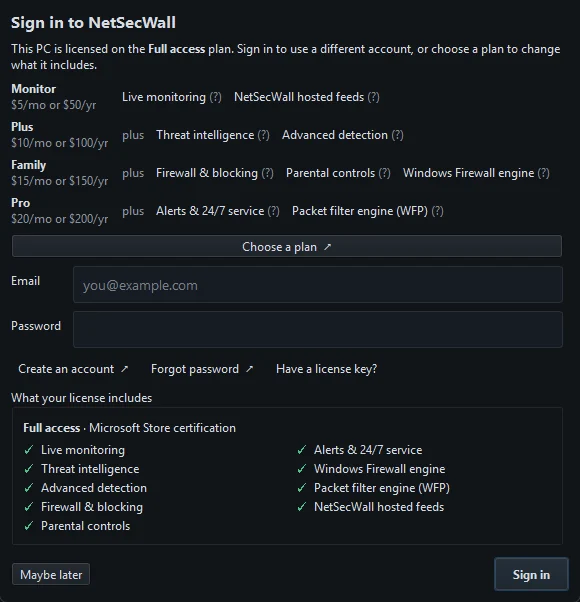
Verify this PC in your browser
Sometimes the server asks for a quick human check before it accepts a sign-in from the app. When it does, a Verify this PC in your browser ↗ button appears in the dialog.
- Click Verify this PC in your browser ↗.
- Finish the one-click check in the browser.
- Go back to NetSecWall and click Sign in again.
The lock screen
When there's no active trial or license, the tabs are replaced by a screen titled "NetSecWall is locked". Nothing is monitored or blocked while it's showing. Your history, rules and settings stay on the PC. The text under the title gives the reason:
- "Connect to the internet once to start your free 7-day trial…" This PC has never reached NetSecWall's server. Connect it and click Retry. See the free trial.
- "Your free 7-day trial has ended…" Buy a plan, or sign in if you already have one.
- "Your plan has expired…" Renew, then click Retry.
- "This key has been blocked…" The key on this PC was revoked, and the reason is shown if there is one. Contact support, or sign in with a different license.
- "This device has been blocked. Contact support if you believe this is a mistake." This PC itself, not just the key, is blocked on the server.
- "This PC is managed by your organization…" Your company's Management Server assigns the license. Contact your IT administrator.
The buttons:
- Start your free trial ↗ (before the first contact) or Choose a plan — from $5/mo ↗ opens the website. The button still quotes a monthly price, but only yearly plans are sold today, from $50/yr. See which plan you need.
- Sign in opens the Sign in dialog.
- Retry checks with the server again, for example right after you've paid or reconnected.
Lost your key?
Keys are emailed as soon as payment clears. To get them sent again, sign in to your account at netsecwall.com/account and click Email me my keys. If you've signed in to the app with your account before, Help ▸ Open my account in browser… opens the account page without typing anything. Otherwise it says "You're not signed in yet".
You don't always need the key. Signing in to the app with your account email and password activates this PC too.
When to open a ticket
- A key copied straight from the email still "isn't recognized".
- The key or device is blocked and you don't know why.
- You renewed, but the app still says the plan has expired after clicking Retry.
Include the license key, your order reference (NL-…) and your app version (Help ▸ About NetSecWall). That saves a round trip. Replies come within one business day, Monday to Friday.
Frequently asked questions
Does reinstalling NetSecWall reset the trial?
No. The trial is tied to the device on the server, so reinstalling doesn't start a new one.
Does NetSecWall need the internet to keep working after activation?
Only now and then. It checks the license at launch and once a day, and between checks it keeps working offline on the entitlement it saved last time, until that entitlement's own end date.
Can I move my key to a new PC?
Yes. If you signed in with your account, click Sign out on the old PC to release its seat, then sign in on the new one. For the other cases, see moving your license.
Is my data deleted when the license runs out?
No. History, rules and settings stay on the PC, and NetSecWall picks up where it left off once a plan is active again.