Set an internet bedtime (curfew)
In Protection ▸ Parental controls…, tick Block all internet during these hours, set From and until (overnight is fine), pick the days and click Save. The internet goes off at that time.
NetSecWall for WindowsOn this page
To set an internet bedtime, open Protection ▸ Parental controls…, tick Block all internet during these hours, choose the From and until times and the days, and click Save. The default is 21:00 until 07:00, every day. At bedtime NetSecWall cuts all internet access on the PC and shows "Parental controls — internet paused". At the end time the internet comes back on its own.
Bedtime is part of parental controls, included in the Family and Pro plans and the 7-day trial.
Set an internet bedtime in five steps
- Open Protection ▸ Parental controls… and enter the settings password. If you haven't set one yet, do that first under Protection ▸ Settings password…. Without it, anyone can switch bedtime off.
- Make sure Protect this device with parental controls is ticked. Bedtime does nothing without this master switch.
- Under Bedtime — turn the internet off on a schedule, tick Block all internet during these hours.
- Set From and until in 24-hour time. An overnight window such as 21:30 until 07:00 is fine.
- Tick the days it should apply (Mon to Sun), then click Save.
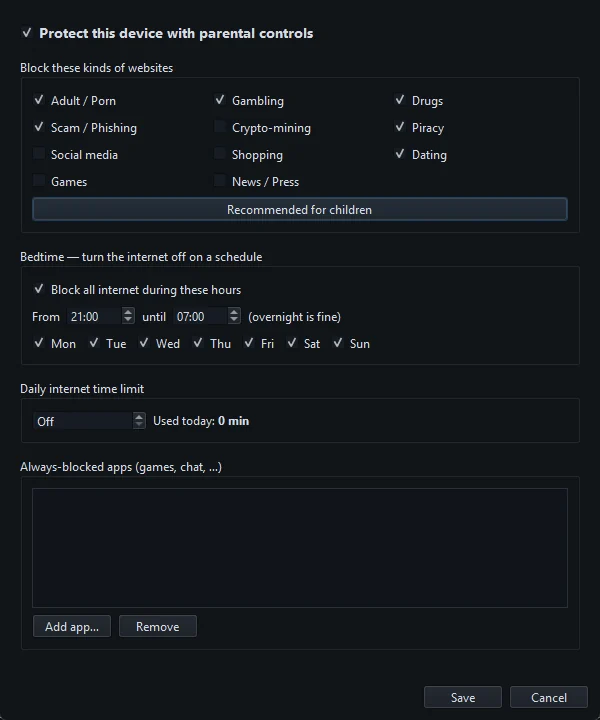
If the start and end times are the same, the dialog warns: "Start and end are the same, so the curfew would never apply." Change one of them.
How the days work for an overnight bedtime
A day's tick covers the bedtime that starts that evening. With 21:00 until 07:00:
| Ticked days | What happens |
|---|---|
| Every day | Internet off from 21:00 to 07:00 every night |
| Sun to Thu only | School nights are covered. Friday and Saturday evenings stay online. Thursday's bedtime still ends at 07:00 on Friday. |
| Fri and Sat only | Only the weekend nights |
A window that doesn't cross midnight, such as 13:00 until 15:00, simply applies on the ticked days. There is one bedtime window. You can't set different hours for different days.
What happens at bedtime
- Within about 30 seconds of the start time, NetSecWall switches on its block-all rule, the same one behind Block all outbound. Every program on the PC loses the internet, for every Windows user.
- A tray message titled "Parental controls — internet paused" says "Bedtime or the daily time limit is active." The status bar shows Bedtime and Block-all ON.
- Wi-Fi stays connected. Only this PC's internet traffic is blocked. Other devices on your network are not affected.
- At the end time, the block lifts and the tray shows "Parental controls — internet back on".
If the daily time limit has run out as well, the internet stays off until both allow it. A limit used up in the evening keeps the PC offline through bedtime until the bedtime ends the next morning.
Things that affect bedtime
- NetSecWall has to be running. Bedtime is checked by the NetSecWall app every 30 seconds. It can sit in the tray. It doesn't start by itself when Windows starts, so open it again after a restart. The settings password stops anyone quitting it.
- It follows the PC's clock. Bedtime uses local time, so if the clock or time zone changes, bedtime moves with it.
- You need the internet during bedtime. Open Protection ▸ Parental controls… with the password, untick Block all internet during these hours and click Save. Remember to tick it again afterwards. The tray's Block ALL internet switch can't override a bedtime.
Bedtime is one part of a local, password-protected setup. Someone with Windows administrator rights can get around it. See setting up parental controls for the full picture, and our bedtime guide for parents for the practical side.
Frequently asked questions
Can I set a different bedtime on weekends?
Not a different time. There is one bedtime window, and you choose which days it applies. For example, tick Sunday to Thursday for school nights only.
Does bedtime turn off the Wi-Fi?
No. It blocks internet traffic from this PC through the firewall. The PC stays connected to your network, and other devices are unaffected.
What if the PC is switched on during bedtime?
Once NetSecWall is running, it applies the curfew within about 30 seconds. Bedtime doesn't need the PC to be on at the start time.
Why didn't bedtime start?
Check that Protect this device with parental controls is ticked, that the day is ticked, that the start and end times differ, and that NetSecWall is running. Your plan must also include parental controls (Family, Pro or the trial).