A daily internet limit that counts time online, not screen time
A screen-time limit counts every minute the PC is in use. NetSecWall's daily internet time limit counts only time when the PC has an open connection, in 30-second steps, and resets at midnight.
NetSecWall for Windows
On this page
Most screen-time limits count every minute a child is signed in, whether they're writing an essay offline or scrolling a video feed. A daily internet time limit counts something narrower: time when the PC is actually connected. NetSecWall's version checks every 30 seconds whether any program has an open connection, adds that half-minute to today's total if one does, and switches the internet off for the rest of the day when the total reaches your limit. It resets at midnight.
Screen time and internet time are different things
A screen-time limit answers "how long has the computer been in use?" That includes drawing, reading a downloaded book, practicing typing and playing a game with no online part. For some families that's exactly the right measure: the concern is time in front of a screen, whatever is on it.
For others, the concern is the internet in particular: the feeds, chats, videos and online games that are hardest to put down. Counting offline homework against the same allowance feels unfair to a child and makes the rule harder to defend. An internet time limit leaves offline use alone and only spends the allowance while the PC is online.
Neither approach is wrong. Choose the one that matches the rule you actually want, and tell your child which one it is.
How NetSecWall counts internet time
- Every 30 seconds, NetSecWall checks whether any program on the PC has an open connection to another machine. Traffic that stays inside the PC doesn't count.
- If there is one, 30 seconds go onto today's total. If there isn't, nothing is added.
- Time the PC is off, asleep or disconnected isn't counted.
- The total resets when the date changes at midnight, local time.
- When today's total reaches the limit, all internet on the PC is blocked until midnight.
Here's the honest part. The check is about the PC being online, not about your child's attention. Windows and many background programs, such as updaters, sync clients and chat apps sitting in the tray, keep connections open while nobody is using them, and that time counts too. A browser tab left open on a video site counts even if the video is paused.
So on many PCs the counter runs for most of the time the PC is awake and connected. It still leaves out offline stretches, and it won't count while the PC sleeps, but it measures "time this PC spent online" rather than "time my child spent on the internet." It's worth knowing before you choose a number.
Choose a limit you can defend
Before you set a number, watch the counter for a few days.
- Turn parental controls on with the limit set to Off.
- Each evening, open Protection ▸ Parental controls… and note Used today. The count runs whenever parental controls are on, even with no limit set.
- If the number seems high for how the PC was used, open the Live tab and look at which programs hold connections while nobody is at the keyboard. Closing or blocking the ones you don't need makes the count closer to real use. Seeing which apps use the internet shows how.
- Set the limit a little above a normal day, then adjust.
Set a daily internet time limit in NetSecWall
Parental controls are part of the Family and Pro plans, and of the 7-day trial.
- Open Protection ▸ Parental controls…. If a settings password is set, type it.
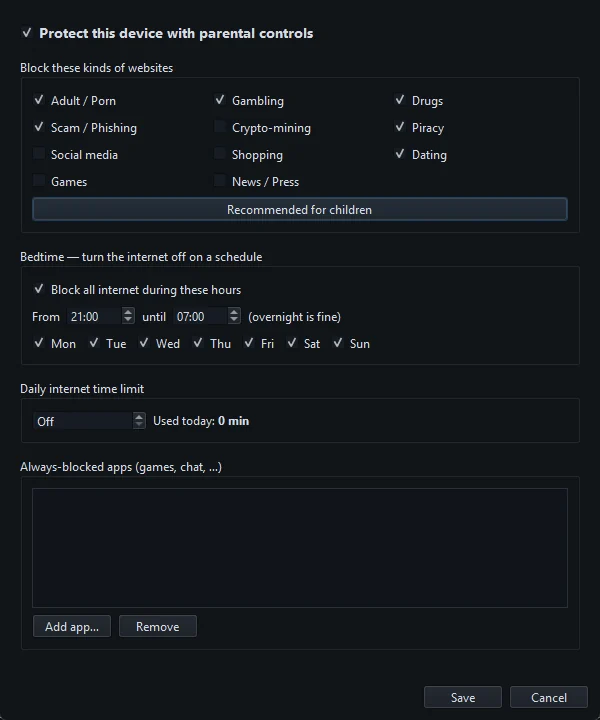
- Tick Protect this device with parental controls.
- Under Daily internet time limit, set the minutes per day. The box moves in 15-minute steps, up to 1,440; Off means no limit.
- Click Save.
- If you haven't already, set a password with Protection ▸ Settings password…, so the limit can't just be raised by whoever is at the keyboard.
The Help Center's daily internet time limit article is the short reference version.
What happens when the time runs out
At the next 30-second check after the total reaches the limit, NetSecWall blocks all internet on the PC. If NetSecWall is running on your child's desktop, a notification says Parental controls — internet paused. Everything that works offline carries on. At midnight the total resets and the internet comes back.
There's no warning before the limit is reached, so teach your child to check, or agree that you'll give a heads-up.
To give extra time on a particular day, open Parental controls…, raise the limit and click Save. The time already used stays counted; if the new limit is above it, the internet comes back straight away.
The limit and the internet bedtime work together: whichever applies first switches the internet off. If games are the real concern, blocking games during homework targets them specifically.
Limits to know
- One limit per PC. It isn't per Windows account or per app. If you use the same PC, your online time counts against the same total.
- It needs NetSecWall running. The count and the block are done by the NetSecWall app, so keep it open in the tray. It doesn't start by itself when someone signs in; after a restart, open it again. On your child's standard account, Windows asks for your administrator password.
- It covers this PC only. A phone or tablet has its own allowance, or none.
- It can be got around by someone with an administrator password or another device. Can kids get around parental controls? covers the gaps honestly.
A limit is a boundary you set together, not a punishment. It tends to work better when your child knows the number, knows how it's counted, and can see it's the same every day.
To try it on your family's PC, download the 7-day trial. Every feature is unlocked.
Frequently asked questions
Does time spent offline count against the limit?
No. Only 30-second stretches in which some program has an open connection count. Offline homework, reading or games with no online part don't use up the allowance.
When does the daily limit reset?
At midnight, local time, when the date changes. The internet comes back then even if the limit was used up.
Can I set different limits for weekdays and weekends?
No. There is one daily number. You can change it at any time with the settings password, for example raising it on Saturday morning.
Why is "Used today" higher than I expected?
Background programs, and browser tabs left open, can keep connections open while nobody is using the PC. Check the Live tab for programs that are always connected and close or block the ones you don't need.
Does the daily limit count time on my child's phone?
No. It counts this PC's connections only. Phones and tablets need their own controls.
Keep reading
 How to set an internet bedtime on your kid's PC
Set a schedule that switches the internet off at night, on your router or on the PC itself. NetSecWall's bedtime blocks all internet on the PC between two times you choose, overnight included.
 Parental controls on a Windows PC without a Microsoft account
Windows' own family features need Microsoft accounts. Without them, give your child a standard local account and use an on-PC tool that filters sites and sets a bedtime and daily limit.
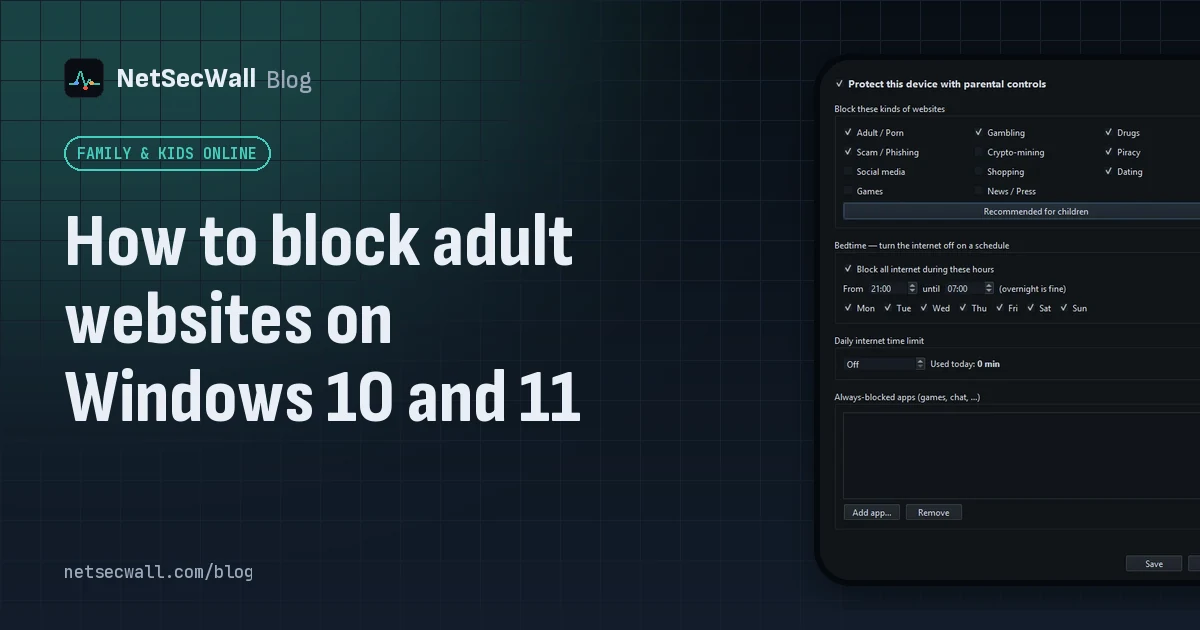 How to block adult websites on Windows 10 and 11
Use a family DNS filter on your router, a filter on the PC, or both. NetSecWall blocks its Adult / Porn category, around 900,000 domains, for every browser and app on the PC, behind a password.
 Block games during homework time
Block the game programs themselves, not just gaming websites. NetSecWall can cut a game's internet for good or for an hour, block gaming sites, and hold new apps until you approve them.