Set a daily internet time limit
In Protection ▸ Parental controls…, set the Daily internet time limit in minutes and click Save. Time counts only while the PC is online; at the limit, the internet is off until midnight.
NetSecWall for WindowsOn this page
To set a daily internet time limit, open Protection ▸ Parental controls…, enter the number of minutes under Daily internet time limit, and click Save. NetSecWall counts time only while the PC is actually online. When the day's allowance is used up, it cuts all internet access until local midnight, when the count starts again from zero.
The daily limit is part of parental controls, included in the Family and Pro plans and the 7-day trial.
Set the daily internet time limit
- Open Protection ▸ Parental controls… and enter the settings password. If you haven't set one, do it first under Protection ▸ Settings password…. Without it, anyone can raise the limit.
- Make sure Protect this device with parental controls is ticked. The limit does nothing without this master switch.
- Under Daily internet time limit, set the minutes. The arrows move it in 15-minute steps, from Off (0) up to 1,440 minutes (24 hours), and reads, for example, "120 min/day".
- Click Save.
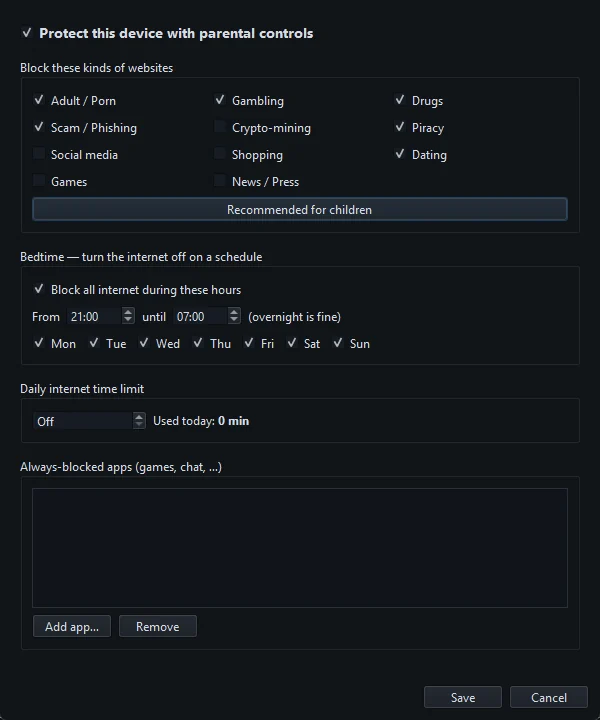
Next to the box, Used today: N min shows how much has been used so far. The figure is taken when you open the dialog, so reopen it to see the latest.
How online time is counted
| Question | Answer |
|---|---|
| How often is time added? | Every 30 seconds, NetSecWall checks the PC and adds 30 seconds if it is online |
| What counts as online? | At least one program has a connection open to an address outside this PC |
| What doesn't count? | Time with no outside connections, and traffic that stays on the PC itself (loopback) |
| When does it reset? | When the date changes on the PC's clock, at local midnight |
| Does it count per app? | No. It is one allowance for the whole PC |
Background programs count too. If a chat app, cloud sync or Windows itself keeps a connection open, the clock keeps running even when nobody is at the keyboard. Put the PC to sleep or shut it down when it isn't in use. More on this: a daily limit that counts real use.
What happens at the limit
- Within 30 seconds of reaching it, NetSecWall switches on its block-all rule, the same one behind Block all outbound. Every program on the PC loses the internet.
- A tray message titled "Parental controls — internet paused" says "Bedtime or the daily time limit is active."
- The block lasts until midnight. After the date changes, the next check lifts it and the tray shows "Parental controls — internet back on".
- Bedtime still applies. If an internet bedtime is running at midnight, the internet stays off until the bedtime ends.
Give extra time today
- Open Protection ▸ Parental controls… with the password.
- Raise the limit, for example from 120 to 150 minutes.
- Click Save. If today's use is below the new limit, the internet comes back straight away.
- Lower it again later if the extra time was a one-off. The new value applies from then on.
Things that affect the limit
- NetSecWall has to be running. Time is counted, and the limit enforced, by the NetSecWall app. It can sit in the tray. It doesn't start by itself when Windows starts, so open it again after a restart. The settings password stops anyone quitting it.
- It can't limit one app. The allowance covers all internet use on the PC. To stop a single game or chat program, add it to Always-blocked apps or block the app.
- It isn't a screen-time tracker. It measures time online, not time spent looking at the screen.
Like the rest of parental controls, the limit is a local, password-protected setting. Someone with Windows administrator rights can get around it. See setting up parental controls.
Frequently asked questions
Does the daily limit count time when the PC is idle?
Only if something on the PC keeps an internet connection open, which background apps often do. Time with no outside connections doesn't count.
Can I set a time limit for one app, like a game?
No. The daily limit covers the whole PC. You can block a specific app completely with Always-blocked apps, or cut its internet from the Live tab.
When does the time limit reset?
At midnight, by the PC's clock. The first check after the date changes starts the day at zero.
Can I give my child more time for one day?
Yes. Raise the limit and click Save. The internet comes back at once if today's use is under the new limit. Lower it again afterwards.