MITRE ATT&CK explained for people who aren't in a SOC
MITRE ATT&CK is a free public catalog of how real attackers operate. Tactics are their goals, techniques are their methods, and knowing the two helps you read a security alert without guessing.
NetSecWall for Windows
On this page
MITRE ATT&CK is a free, public knowledge base of how real attackers behave once they go after a computer or network. It sorts that behavior into tactics, the attacker's goal at a given moment, such as staying hidden or talking to their server, and techniques, the specific methods used to reach each goal. When a security tool tags an alert with an ATT&CK ID like T1059, it's telling you which of those behaviors it thinks it saw.
Security analysts in a SOC (security operations center) use it all day. You don't need to be one to get value from it.
MITRE ATT&CK explained: who makes it and why
MITRE is a US not-for-profit organization that runs research centers for the government. ATT&CK stands for Adversarial Tactics, Techniques, and Common Knowledge. It's built from publicly reported intrusions: when researchers describe how a group or a piece of malware operated, those behaviors are cataloged and linked back to the reports.
It's published free at attack.mitre.org, in several matrices. The Enterprise matrix covers Windows, macOS, Linux, cloud services and networks; separate ones cover mobile devices and industrial control systems. Security vendors use it to label detections, defenders use it to find gaps in what they can see, and testers use it to plan realistic attacks.
Tactics and techniques, in plain words
- A tactic is why: the goal. "Get code running." "Keep access after a reboot." "Get the data out."
- A technique is how: one way of reaching that goal. For example, "use a command interpreter such as PowerShell".
- A sub-technique is a more specific variant. T1059 is Command and Scripting Interpreter; T1059.001 is the PowerShell version of it.
- A procedure is how one particular group or malware family actually did it.
The Enterprise matrix has 14 tactics. Read left to right, they roughly follow how an intrusion unfolds, though real attacks skip steps, repeat them and loop back.
| ID | Tactic | The attacker is trying to… |
|---|---|---|
| TA0043 | Reconnaissance | learn about the target before attacking |
| TA0042 | Resource Development | set up servers, accounts and tools to use |
| TA0001 | Initial Access | get a first foothold |
| TA0002 | Execution | run their code |
| TA0003 | Persistence | keep that foothold across restarts |
| TA0004 | Privilege Escalation | gain higher permissions |
| TA0005 | Defense Evasion | avoid being noticed |
| TA0006 | Credential Access | steal account names and passwords |
| TA0007 | Discovery | learn about the system and network |
| TA0008 | Lateral Movement | move to other machines |
| TA0009 | Collection | gather the data they want |
| TA0011 | Command and Control | communicate with and control the compromised machine |
| TA0010 | Exfiltration | steal that data |
| TA0040 | Impact | disrupt, destroy or hold systems and data hostage |
Each technique page on the site explains the behavior, lists known groups and malware that used it, and suggests mitigations and ways to detect it.
Why it's useful at home
It turns a scary word into a question with an answer. "T1105 Ingress Tool Transfer" sounds alarming. It means "something downloaded a tool onto this machine", which you can check: which program, from where, and did you ask for it?
It helps you weigh several weak signals. One technique on its own is often innocent. Several tactics in a row, say Execution, then Defense Evasion, then Command and Control, from one chain of programs is much less likely to be an accident.
It's a shared vocabulary. If you ask for help in a forum or send a support ticket, "a T1059.001 alert on a PowerShell child of Excel" says more than "my firewall is freaking out".
It shows what a tool covers. A product that maps its detections to ATT&CK is telling you which behaviors it watches, and by omission, which it doesn't.
One caveat: a technique label is not proof of an attack. Many techniques describe normal administration. When you run a PowerShell script, that's T1059.001 too.
Where ATT&CK shows up in NetSecWall
NetSecWall scores programs that reach the network against 21 behavioral signals, and each signal maps to one ATT&CK technique. You can see the whole mapping under Security ▸ MITRE ATT&CK techniques…: a table with the columns Signal, Technique, Tactic and Weight. Click a row to open that technique's page on attack.mitre.org.
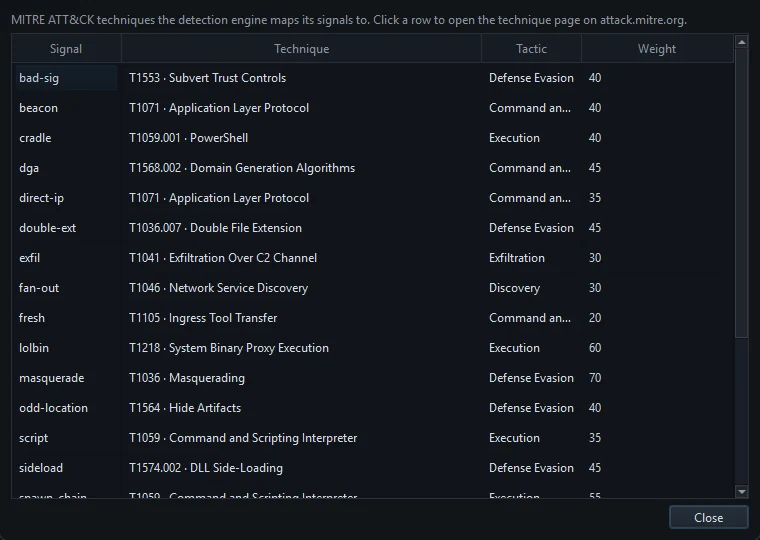
The labels then appear wherever an alert does:
- the MITRE ATT&CK column on the Detections tab, for each risky program (what a risk score means)
- the MITRE ATT&CK column on the Events tab, for alerts; threat-list matches, for instance, are tagged T1071 Application Layer Protocol
- the ATT&CK tab, which pulls it together
Reading the ATT&CK tab
The ATT&CK tab has two parts. The top lists incidents: weak signals from a parent program and the child it launched are fused into one incident, because a chain is more telling than its parts. An incident scores the highest risk among its programs plus 12 for every additional tactic it spans, capped at 100. The Reaches column shows the furthest tactic in the chain.
Below that is the matrix: 12 tactic columns, from Initial Access to Impact. Reconnaissance and Resource Development are left out because they happen before anything touches your PC.
- Open the ATT&CK tab.
- Select an incident. Its techniques light up in the matrix.
- Hover over the incident to see every signal behind it.
- Click a technique in the matrix to read about it on attack.mitre.org.
- Decide: block the program from the Detections tab, or allowlist it if it's software you trust.
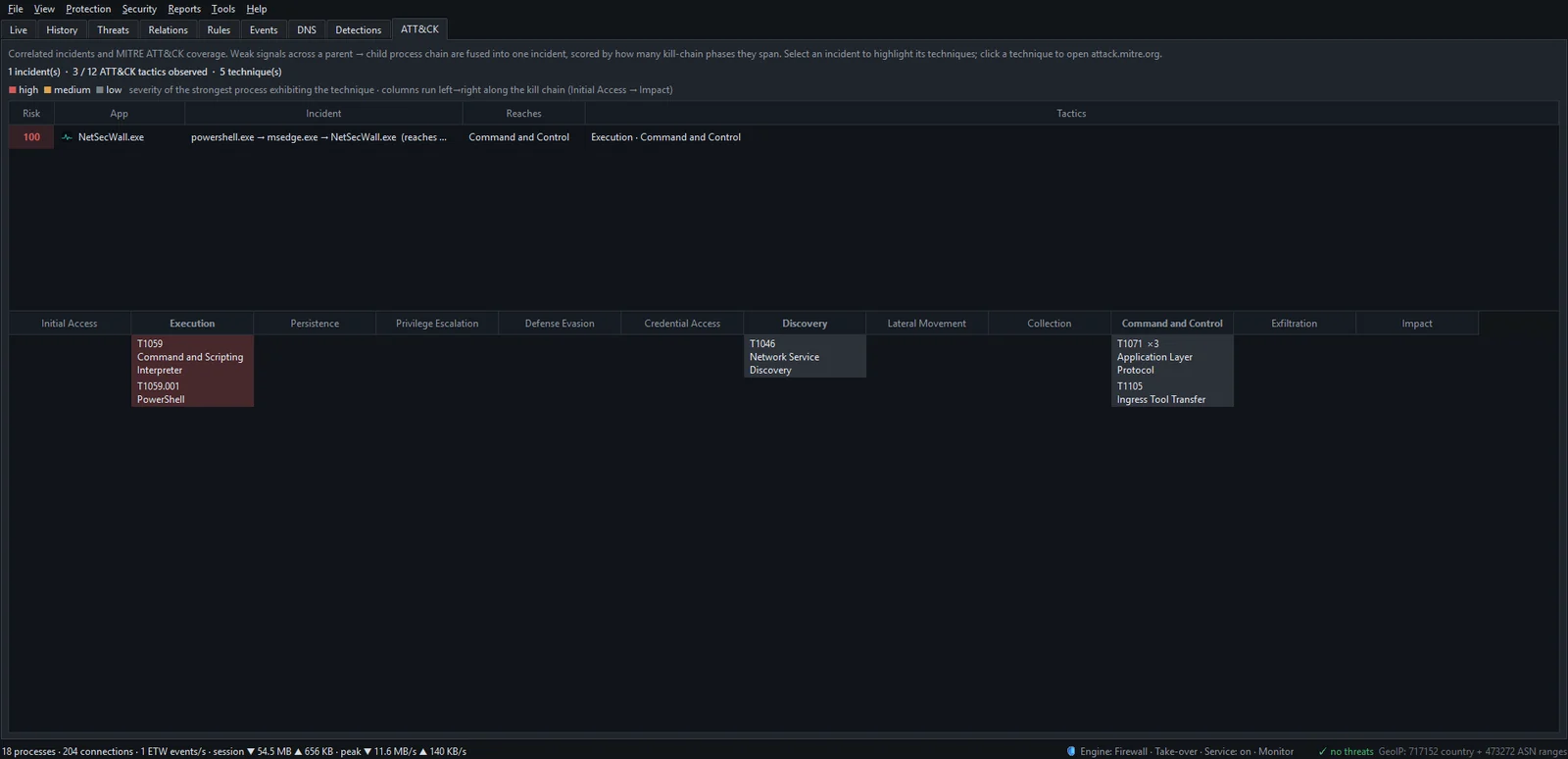
There's a step-by-step walkthrough in reading the ATT&CK tab.
What NetSecWall's matrix can and can't show
NetSecWall watches network connections and the programs behind them. With the default rules, its signals fall under five tactics: Execution, Defense Evasion, Discovery, Command and Control and Exfiltration. Those are the stages that leave marks on the network or in a program's identity: an odd tool going online, a system name in the wrong folder, a steady heartbeat, a lopsided upload. It doesn't see password theft, privilege escalation or anything that stays on the PC. NetSecWall is not an antivirus, so keep Microsoft Defender or your antivirus running alongside.
An empty matrix, "No correlated incidents — nothing suspicious is reaching the network", is the normal and good state.
Where to go next
Two techniques you'll meet most often are explained in what beaconing is and living off the land. To see the ATT&CK tab on your own machine, the 7-day trial has every feature unlocked.
Frequently asked questions
Is MITRE ATT&CK free to use?
Yes. The knowledge base is published free at attack.mitre.org, and anyone can read it and use it to understand or label security events.
What is the difference between MITRE ATT&CK and the Cyber Kill Chain?
The Cyber Kill Chain, from Lockheed Martin, is a high-level model of an attack in seven sequential phases. ATT&CK is far more detailed, catalogs hundreds of specific techniques, and doesn't assume attacks move in a straight line.
Does an ATT&CK label on an alert mean I've been hacked?
No. It names the behavior that was seen, and many techniques also describe normal administration. It's a starting point for checking which program did it and why.
How often does MITRE ATT&CK change?
MITRE updates it regularly, typically a couple of times a year. Techniques get added, renamed and occasionally merged, so a tool's labels can lag slightly behind the current version.
Why does NetSecWall show 12 tactics instead of 14?
Reconnaissance and Resource Development happen on the attacker's side before your PC is involved, so a tool on your PC has nothing to show for them.
Keep reading
 When a trusted app's file suddenly changes
A trusted app's file changing usually means an update. Worry when the change brings a lost or broken signature, or new destinations — the marks of a tampered, supply-chain-compromised app.
When a trusted app's file suddenly changes
A trusted app's file changing usually means an update. Worry when the change brings a lost or broken signature, or new destinations — the marks of a tampered, supply-chain-compromised app.
 What is beaconing? How malware checks in with its server
Beaconing is malware's regular check-in with its command-and-control server. The steady timing is hard to hide, so a program contacting one address like clockwork is worth a look.
What is beaconing? How malware checks in with its server
Beaconing is malware's regular check-in with its command-and-control server. The steady timing is hard to hide, so a program contacting one address like clockwork is worth a look.
 Living off the land: when Windows' own tools go rogue
Attackers often skip custom malware and use tools Windows already ships, such as PowerShell, certutil and mshta. The files are genuine, so the tell is behavior, like those tools reaching the internet.
Living off the land: when Windows' own tools go rogue
Attackers often skip custom malware and use tools Windows already ships, such as PowerShell, certutil and mshta. The files are genuine, so the tell is behavior, like those tools reaching the internet.
 The upload pattern that should worry you
Worry when one program uploads far more than it downloads, in bulk, to a place you can't explain. That's the shape of data theft. Backups and sync look the same, so context decides.
The upload pattern that should worry you
Worry when one program uploads far more than it downloads, in bulk, to a place you can't explain. That's the shape of data theft. Backups and sync look the same, so context decides.