Living off the land: when Windows' own tools go rogue
Attackers often skip custom malware and use tools Windows already ships, such as PowerShell, certutil and mshta. The files are genuine, so the tell is behavior, like those tools reaching the internet.
NetSecWall for Windows
On this page
"Living off the land" means an attacker uses programs already on your PC, usually genuine, Microsoft-signed parts of Windows, instead of bringing their own malware. These living off the land binaries are called LOLBins. Because the files are legitimate, a file scan finds nothing wrong with them; the giveaway is what they do, especially when a tool that almost never needs the internet starts making connections.
Living off the land binaries: what counts as a LOLBin
Windows ships hundreds of administrative utilities. A handful can download files, run a script straight from a web address, or execute code on behalf of something else. The community-run LOLBAS project ("Living Off The Land Binaries, Scripts and Libraries") documents them and how each can be misused. A few of the best known:
| Tool | Legitimate job | How it gets misused |
|---|---|---|
certutil.exe |
Manage certificates | Download a file from a URL; decode a Base64-encoded payload |
bitsadmin.exe |
Manage background transfers | Queue a download through the Background Intelligent Transfer Service (ATT&CK T1197 BITS Jobs) |
mshta.exe |
Run HTML Applications | Run a script fetched from a web address (T1218.005 Mshta) |
regsvr32.exe |
Register COM components | Fetch and run a remote scriptlet (T1218.010 Regsvr32) |
rundll32.exe |
Run a function inside a DLL | Launch malicious DLL code under a trusted name (T1218.011 Rundll32) |
msbuild.exe |
Build .NET projects | Compile and run code hidden in a project file (T1127.001 MSBuild) |
powershell.exe |
Automation and administration | Download-and-run one-liners, often encoded (T1059.001 PowerShell) |
Three of them are sub-techniques of ATT&CK technique T1218 System Binary Proxy Execution: using a trusted, signed system program as a front for malicious content.
Why signatures and file scans don't help
A traditional scan asks, "Is this file bad?" For a LOLBin the answer is no. certutil.exe in System32 is the real, Microsoft-signed file, and deleting or blocking it wholesale could break Windows or your own admin work.
The malicious part lives elsewhere: in the command line, in a script on a web server, or in memory. Modern antivirus does look at behavior. Microsoft Defender, for example, inspects PowerShell and other script content at run time through the Antimalware Scan Interface (AMSI), and it catches a lot. But a new command line or an unusual chain of tools may not match anything it knows.
What reliably separates abuse from normal use is context:
- Who launched it. Word or Excel starting PowerShell is a classic macro-malware chain. You starting PowerShell from the Start menu isn't.
- What's on the command line. Encoded commands, hidden windows and "download this string and run it" are red flags.
- Whether it goes online. On a typical home PC,
mshta.exeorcertutil.execonnecting to the internet is rare enough to be worth a look every time.
What you can do with Windows alone
- Block outbound access for tools you never use online. In Windows Defender Firewall with Advanced Security (
wf.msc), create outbound block rules forcertutil.exe,mshta.exeandregsvr32.exe. Most exist twice, inC:\Windows\System32andC:\Windows\SysWOW64, so block both copies. Test afterwards; don't do this torundll32.exe, which Windows itself uses constantly. - Use Microsoft Defender's attack surface reduction (ASR) rules where your setup supports them. One of them blocks Office applications from creating child processes, which breaks the Word-to-PowerShell chain. They're configured through Group Policy, Intune or PowerShell.
- Keep macros off for documents from the internet, which is now the Office default.
These help, but none of them tells you when a LOLBin actually went online, or what launched it.
How NetSecWall watches Windows' own tools
NetSecWall scores every program that reaches the network against 21 behavioral signals. Four of them are about living off the land:
| Signal | What trips it | ATT&CK technique | Weight |
|---|---|---|---|
| lolbin | A tool on the LOLBin list (26 by default, including mshta, certutil, bitsadmin, regsvr32, cmstp, msbuild) connects out | T1218 System Binary Proxy Execution | 60 |
| script | powershell, pwsh, wscript or cscript connects out | T1059 Command and Scripting Interpreter | 35 |
| cradle | Download or obfuscation markers on the command line, such as -enc, iex, downloadstring, -w hidden, bypass, -urlcache |
T1059.001 PowerShell | 40, plus 15 for two or more markers |
| spawn-chain | Word, Excel, PowerPoint, Outlook, OneNote, mshta, a script host, WinRAR or 7-Zip launches a shell or LOLBin | T1059 Command and Scripting Interpreter | 55 |
Weights add up to a risk score from 0 to 100. At 40 or more the program appears on the Detections tab and the "Suspicious process online" alert fires; that alert is on by default. So PowerShell going online on its own (35) stays quiet, while PowerShell started with an encoded command and a hidden window (35 + 55) scores 90. The ATT&CK tab then joins a parent and child that both look wrong, such as a document app and the shell it launched, into a single incident.
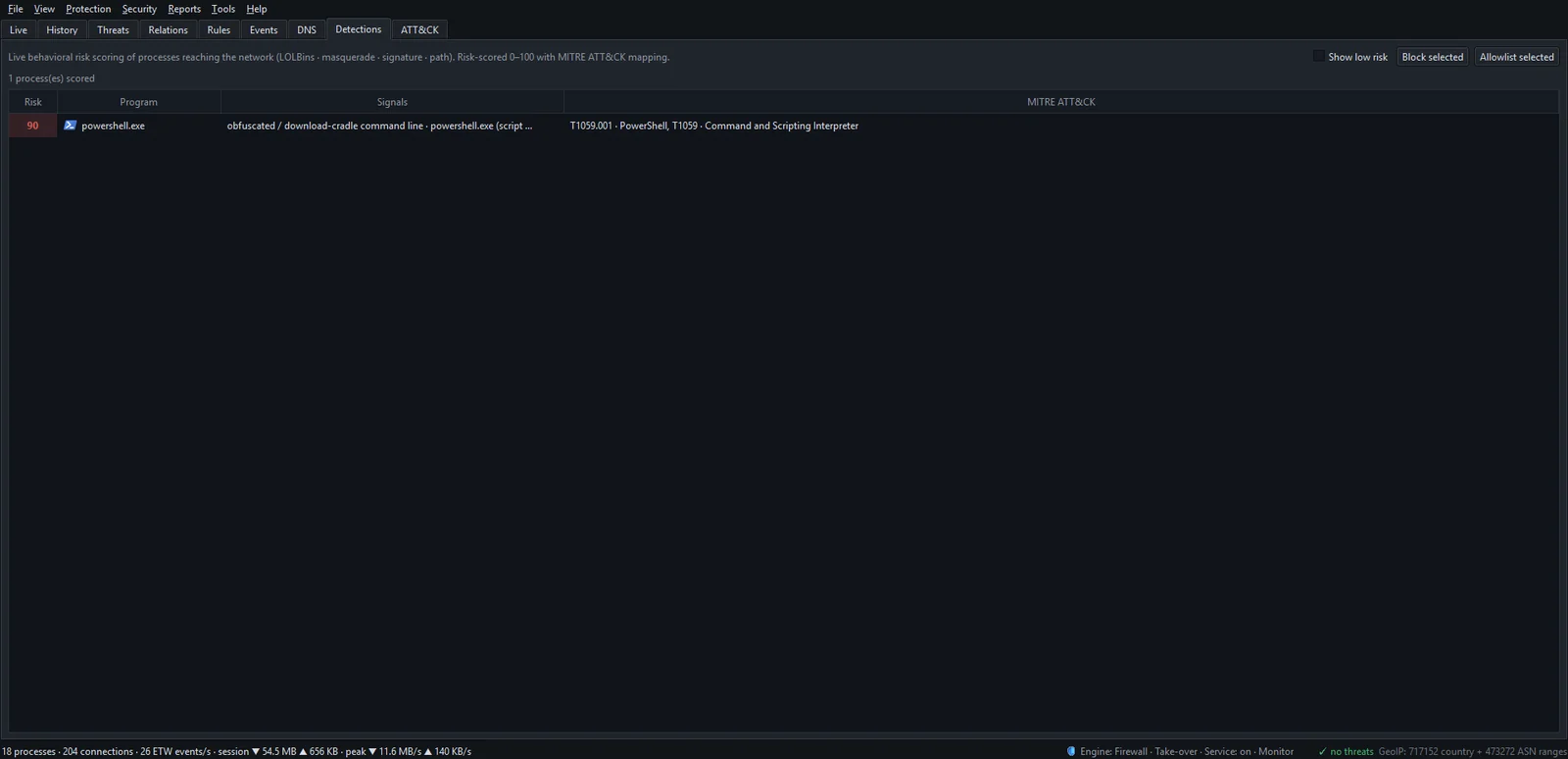
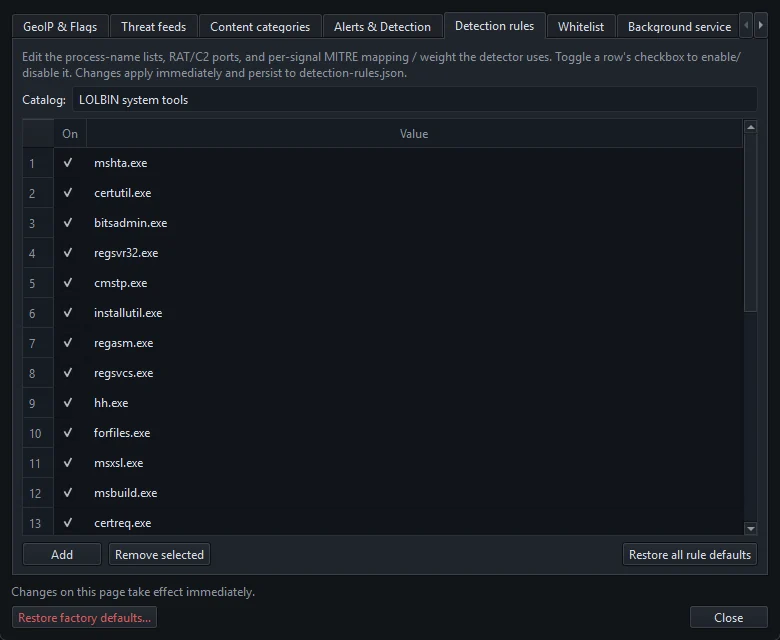
Every list behind these signals is editable. To add a tool, for example rundll32.exe, which is on the default list only as a launched child, not as a LOLBin in its own right:
- Open Security ▸ Detection rules….
- In Catalog:, choose LOLBIN system tools.
- Click Add, type
rundll32.exein the new row and press Enter.
Changes apply immediately and are saved to detection-rules.json. Expect more noise from rundll32.exe than from the defaults. Restore all rule defaults undoes everything.
To cut a tool off entirely, pick it with Block an app… on the Rules tab, or right-click it in the Live tab and choose Block this app (firewall) ▸ Block (permanent). Blocks are keyed to the file path, so block the SysWOW64 copy too. See how to block an app.
Don't allowlist a LOLBin by path, and think twice about allowlisting the "Microsoft Windows" publisher. Allowlisted programs are never scored. The Seed trusted publishers button on Security ▸ App whitelist… adds both "Microsoft Windows" and "Microsoft Corporation", which stops NetSecWall scoring Windows' own tools and Office, and with them the signals in this article. See allowlisting trusted apps before you use it.
What this can't catch
- Tools that stay offline. NetSecWall scores programs that reach the network.
certutil -decodeon a local file makes no connection and isn't seen. - BITS downloads. A transfer queued with
bitsadmin.exeis carried out by the BITS service insidesvchost.exe, so the connection shows under that service, not underbitsadmin.exe. - Legitimate admin work. IT scripts, installers and updaters use PowerShell too. Read the parent and the command line before deciding.
- Content. NetSecWall isn't an antivirus and doesn't read scripts or traffic. It flags the behavior; Defender judges the code.
For how the score works, see the Detections tab and risk scores.
Try it on your own PC
Open the Detections tab for a week and you'll learn which of Windows' tools your PC actually uses online. The 7-day trial includes every signal here. For the vocabulary behind the T-numbers, read MITRE ATT&CK explained.
Frequently asked questions
Should I delete or disable PowerShell?
No. It's part of Windows and many tools depend on it. If you never use it online, you can block its internet access and remove the rule when an installer or script needs it.
Why doesn't my antivirus flag certutil or mshta?
Because the files are genuine and signed. Antivirus judges the file and, increasingly, the script content; a legitimate tool doing something unusual may not match anything it knows.
Is it normal for PowerShell to connect to the internet?
Sometimes. Installing modules, some installers and admin scripts do it. Unexplained PowerShell connections, especially with encoded commands or launched by an Office app, are worth investigating.
What is the LOLBAS project?
A community-maintained catalog of Windows binaries, scripts and libraries that can be misused, with the functions each offers an attacker. Defenders use it to decide what to monitor or restrict.
Can I block Windows tools from the internet without breaking Windows?
Tools such as certutil, mshta and regsvr32 rarely need the internet on a home PC, so blocking them is usually safe. Leave rundll32 and svchost alone, and test after each change.
Keep reading
 When a trusted app's file suddenly changes
A trusted app's file changing usually means an update. Worry when the change brings a lost or broken signature, or new destinations — the marks of a tampered, supply-chain-compromised app.
 What is beaconing? How malware checks in with its server
Beaconing is malware's regular check-in with its command-and-control server. The steady timing is hard to hide, so a program contacting one address like clockwork is worth a look.
 Why you need a firewall and an antivirus, and what each one misses
An antivirus judges files and program behavior; a firewall judges connections. Each misses what the other sees, from a clean-looking tool phoning out to malware that never touches the network.
 MITRE ATT&CK explained for people who aren't in a SOC
MITRE ATT&CK is a free public catalog of how real attackers operate. Tactics are their goals, techniques are their methods, and knowing the two helps you read a security alert without guessing.