NetSecWall for Android: what it does and how it works (beta)
A beta DNS firewall for Android 7.0 and newer, included with every NetSecWall plan for Windows and the free trial. It blocks ad, tracker and malware domains on the phone itself, with no root, once it's linked to your PC.
NetSecWall for AndroidOn this page
NetSecWall for Android (beta) is a DNS firewall for Android 7.0 and newer. It answers lookups for domains on your blocklists with "does not exist", so ads, trackers and known malware hosts don't load in any app. Filtering runs entirely on the phone and needs no root. The app is included with every NetSecWall plan for Windows and the free 7-day trial, and it works while it's linked to a PC that has one. You install it as a signed APK from the Android page, which also shows how to check the file's signature and checksum. This page explains what the app does and how it works.
The app isn't on Google Play. It's published only on netsecwall.com, as an APK signed with NetSecWall's own key. Download it from the Android page and nowhere else.
First, link it to your PC
Since version 0.4.0 the app opens to Link your PC and does nothing until it's linked. On the PC, choose Help ▸ Link a phone… in NetSecWall, then tap Scan the code or Type the code instead on the phone. Any plan (Monitor, Plus, Family or Pro) or the trial works, and one PC can have up to 5 phones. The phone has no account of its own. If the PC's plan ends, protection carries on for 14 days, then stops until the phone is linked again. Link NetSecWall for Android to your PC has the steps.
How NetSecWall for Android works
The default engine is called VPN filter (DNS). It uses Android's VPN feature, but nothing leaves the phone to a NetSecWall server. The "VPN" is a local filter, and only DNS lookups go into it. All other traffic goes out untouched.
Each lookup is checked in this order:
- Your Always block overrides.
- Your Always allow overrides.
- Your enabled blocklists (or Lockdown, if you've switched it on).
- If nothing matched, the lookup goes to your DNS resolver: 1.1.1.1 by default, or the DNS-over-HTTPS endpoint you've chosen.
A blocked name gets an NXDOMAIN ("does not exist") answer by default, so the app never gets an address to connect to. Blocking a domain also blocks its subdomains. Besides the resolver you choose, the app talks only to netsecwall.com, for its blocklists, a daily update check and a daily check that your PC's plan is still active, and to any list you add by URL. Nothing you browse goes to NetSecWall, and there's no analytics and no crash reporting.
Because it works on names, it blocks the same domains for every app. It can't see or stop individual connections. For the lists and DNS options, see blocklists, overrides and DNS settings.
The engines
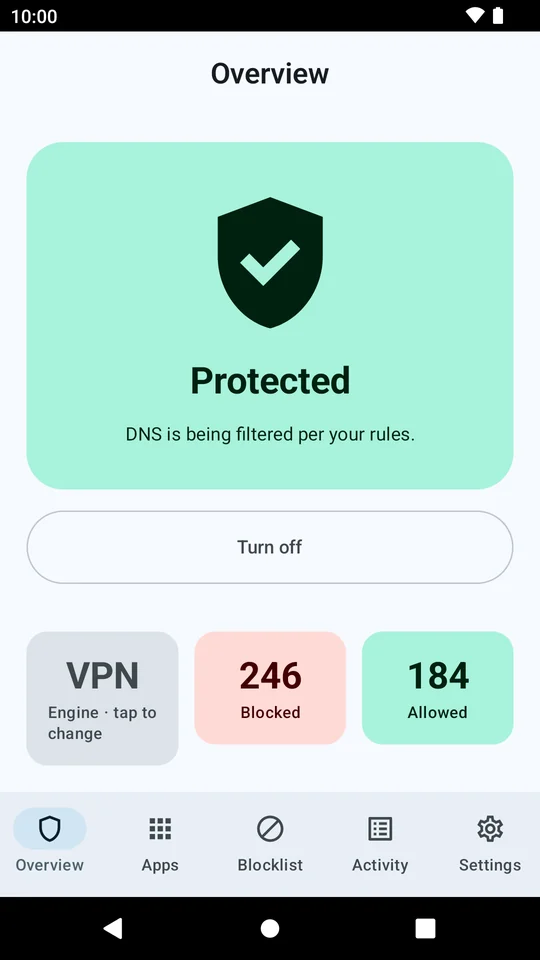
Only one engine runs at a time. Tap the Engine · tap to change card on Overview to pick one.
| Engine | Needs | Status | What it does |
|---|---|---|---|
| VPN filter (DNS) | Nothing extra | Default. The one the website presents as working. | Filters DNS lookups against your blocklists |
| Full-tunnel filter | Android 10+ for per-app rules | Experimental | Routes all traffic through an on-device relay and applies per-app rules |
| Root firewall (netfilter) | Root | Never tested on a real rooted phone | Per-app rules in the kernel |
| Root firewall (eBPF) | Root, Android 11+ | Untested | Per-app rules through the system's network daemon |
Blocklist filtering is off while a root engine runs. The Apps tab lets you set per-app Wi-Fi, Data and LAN rules, but in the default mode they're only saved, not enforced. The app says so: "The VPN engine filters DNS against blocklists only."
The five tabs
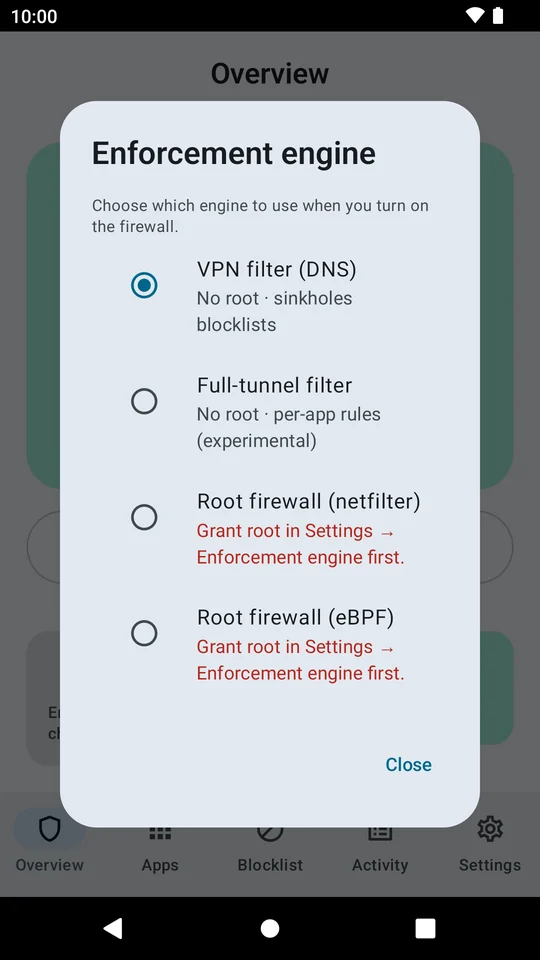
- Overview. Shows "Protected" or "Unprotected", the Turn on VPN firewall or Turn off button, and cards for the engine and the Blocked and Allowed counts. The first time you turn it on, Android asks you to approve the VPN connection, and a "NetSecWall is active" notification stays up while it runs.
- Apps. Search apps and set per-app rules (enforced only by the experimental engines).
- Blocklist. Turn lists on, download them, add your own lists, and add My overrides.
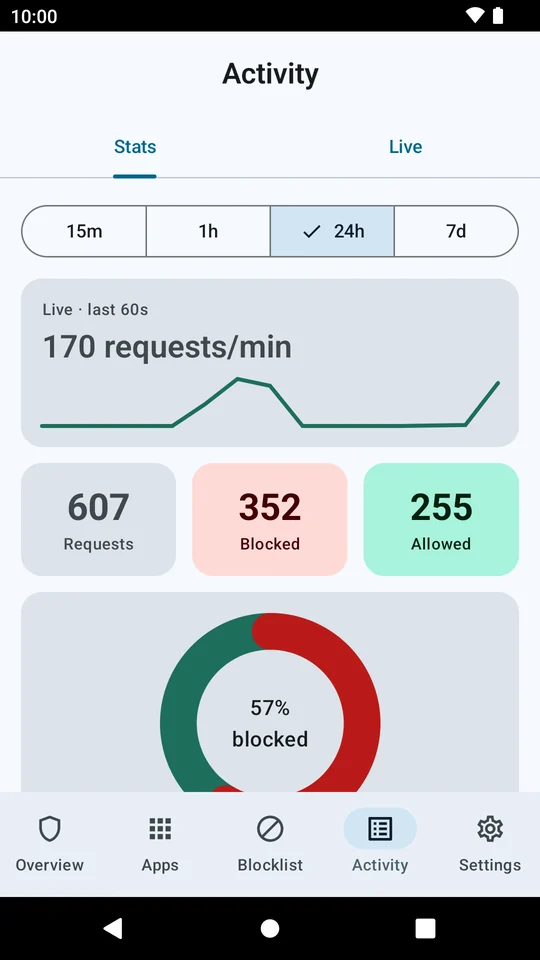
- Activity. Stats shows requests, blocked and allowed counts, a "% blocked" chart, requests per hour, Top domains and Top apps over 15 minutes, 1 hour, 24 hours or 7 days. Live is a searchable, pausable log of up to 500 rows. Seeing which app made a lookup needs Android 10 or newer. On older versions the app column just says "DNS".
- Settings. The link to your PC (Linked to your PC's name, and Unlink this phone), enforcement options, DNS, automation (including Auto-update lists and a daily digest), data usage, configuration export and import, and security.
Quick Settings tile and app lock
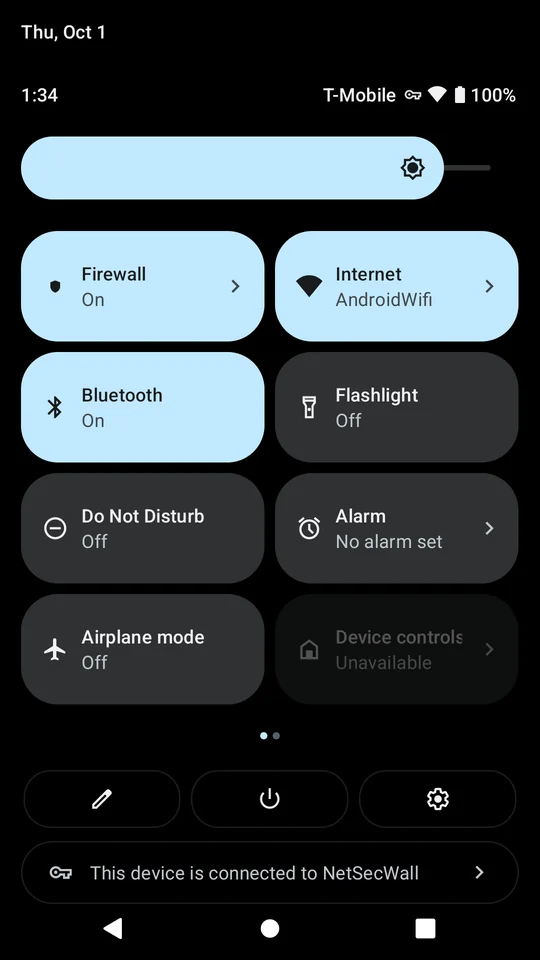
Add the Firewall tile to Android's Quick Settings panel to see whether protection is on. Tapping it while protection is on turns it off. On the lock screen, Android asks you to unlock the phone first. Tapping it while protection is off opens the app so you can turn it on.
Settings ▸ App lock makes the app ask for biometric unlock or your PIN before it opens. Block on boot restarts protection after a reboot.
What it doesn't do
- No per-app blocking in the default mode. Blocklists and overrides apply to every app.
- Apps can go around it. An app with a built-in DNS resolver, its own encrypted DNS, or DNS over TCP isn't filtered, and neither is anything when Android's Private DNS is set to a specific hostname.
- No second VPN. Android runs one VPN at a time. Starting another one stops NetSecWall, and it shows "Protection stopped".
- No IP, port or country blocking, no parental controls, and no time schedules.
- Lists aren't downloaded automatically at first run. Open Blocklist and tap Update enabled.
- Short history. Only the newest 2,000 or so log entries are kept, so counts aren't lifetime totals.
- Not without a PC. It works only while linked to NetSecWall on a Windows PC with a plan or the trial. It doesn't connect to the Management Server.
Frequently asked questions
Do I have to pay for NetSecWall for Android?
Not separately. It's included with every NetSecWall plan for Windows and with the free 7-day trial, on up to 5 phones per PC. The APK is a free download, but the app works only while it's linked to a PC that has a plan or the trial. There's no account of its own and no advertising in the app.
What happens if my PC's plan ends?
The phone keeps protecting you for 14 days, with reminders 7, 3 and 1 day before it stops, and then stops until you renew or link it to a PC with an active plan. The same applies if the PC unlinks the phone or the phone can't reach netsecwall.com. See the 14-day grace period.
Does it need root?
No. The default VPN filter (DNS) engine works on any phone running Android 7.0 or newer. Only the untested root engines need root.
Does my browsing go through a NetSecWall server?
No. Filtering happens on the phone. Allowed lookups go to the DNS resolver you choose, and nothing goes to NetSecWall. For background, see what DNS lookups reveal.
Why isn't it on Google Play?
Google Play's policies restrict apps that filter network traffic across the whole phone, such as blocking ads inside other apps, and that's the core of what this app does. Rather than ship a reduced version, NetSecWall distributes the complete app directly from netsecwall.com, signed and verifiable. The Android page shows how to check the signature.