What is the Windows Filtering Platform?
The Windows Filtering Platform (WFP) is the engine inside Windows that decides whether network traffic may pass. Windows Defender Firewall is built on it, and so are many VPNs and security tools.
NetSecWall for Windows
On this page
The Windows Filtering Platform (WFP) is the part of Windows that decides whether network traffic is allowed through. It lets software place filters at fixed checkpoints in the network stack, and the kernel checks every connection against them. Windows Defender Firewall is built on WFP, and so are many VPN clients, antivirus web shields and third-party firewalls. NetSecWall's Packet filter (WFP) engine uses it too, adding its own filters from user mode, without installing a driver.
What the Windows Filtering Platform is
WFP arrived with Windows Vista and replaced a patchwork of older, fragile ways of hooking into networking. It has three main parts:
- The filter engine, inside the Windows network stack in the kernel. It checks traffic against the filters at each checkpoint and returns a verdict: permit or block.
- The Base Filtering Engine (BFE), a Windows service. It stores and manages the filters, decides who may add or remove them, and hands them to the kernel.
- A management interface that programs use to add filters, and a way for drivers to plug in deeper logic (callouts, below).
Windows Defender Firewall is one client of this system. Its own service takes the rules you see in Windows Defender Firewall with Advanced Security (wf.msc) and turns each one into WFP filters. When people say "the Windows firewall blocked it", WFP did the blocking on the firewall's instructions.
Layers, filters and callouts
An airport is a fair picture. There are checkpoints at fixed places (layers). Each checkpoint has a rulebook (filters). And for unusual cases, an officer can call in a specialist (a callout).
Layers are the checkpoints. Some sit low in the stack and see individual packets. The most useful ones for a firewall are the ALE (application layer enforcement) layers, which make one decision per connection, with the program's identity attached:
- Resource assignment: a program asks to use a local port.
- Listen: a program starts waiting for inbound connections.
- Auth connect: a program opens an outbound connection, or sends its first UDP packet to a new destination.
- Auth receive/accept: an inbound connection or first inbound UDP packet arrives for a program.
- Flow established: a connection has been allowed and set up.
Because ALE decides once per connection rather than once per packet, simple permit and block rules cost very little.
Filters are the rules. Each has conditions (which program, which remote address, which port or protocol, which user), an action (permit, block, or hand over to a callout) and a weight. Filters are grouped into sublayers, one per product or purpose. Within a sublayer, the matching filter with the highest weight decides. Across sublayers, every one gets a say, and a block from any of them generally wins over a permit from another. That is why a block from one security tool usually holds even when another tool's rules would allow the same traffic.
Callouts are code in a kernel driver that WFP calls when a filter says so. They can inspect, change, redirect or inject traffic, which is what VPN clients, parental filters and some antivirus products need.
User-mode filters and kernel callout drivers
Software can use WFP in two quite different ways.
| User-mode filters | Kernel callout driver | |
|---|---|---|
| How it's installed | Filters added through WFP's management interface by a normal (elevated) program | A signed kernel driver loaded into Windows |
| What it can do | Permit or block based on program, address, port, protocol and user | Inspect, modify, redirect or inject packets |
| What a bug can do | Fail to block, or block too much | Crash Windows with a blue screen |
| Typical users | Windows Defender Firewall rules, NetSecWall's WFP engine | VPNs, deep-inspection firewalls, some antivirus network features |
Plain permit/block filters need no driver at all. The kernel already has the machinery; the program just describes what to block.
Looking at WFP yourself
Windows has tools for this, all of which need an elevated Command Prompt:
netsh wfp show filterswrites every current filter tofilters.xmlin the current folder.netsh wfp show statewrites a fuller picture.- Turn on auditing with
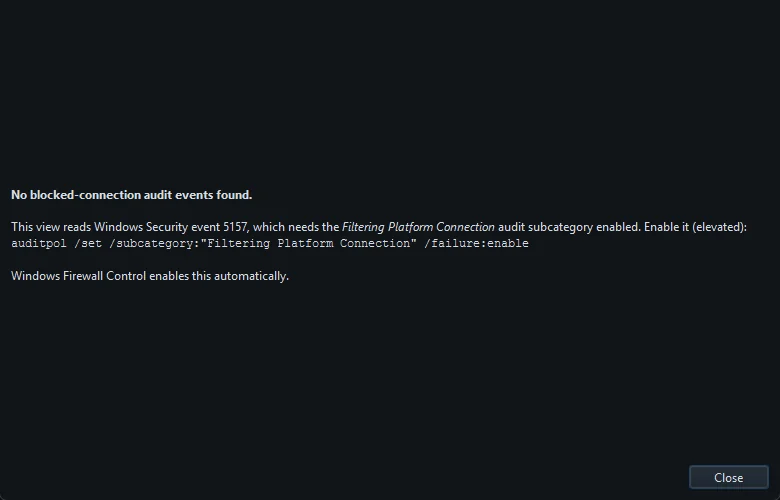
auditpol /set /subcategory:"Filtering Platform Connection" /failure:enable, and every blocked connection is logged in the Security event log as event 5157, "The Windows Filtering Platform has blocked a connection", with the program, direction, addresses, ports and the filter's ID.
NetSecWall reads those events for you. Protection ▸ Blocked connections (firewall log)… lists up to 300 recent blocks with time, direction, protocol, program, remote and local address, whichever WFP filter caused them. See what was blocked covers the setup.
Never stop or disable the Base Filtering Engine service to "fix" a network problem. Windows Defender Firewall, IPsec and every other WFP-based tool depend on it.
NetSecWall's Packet filter (WFP) engine
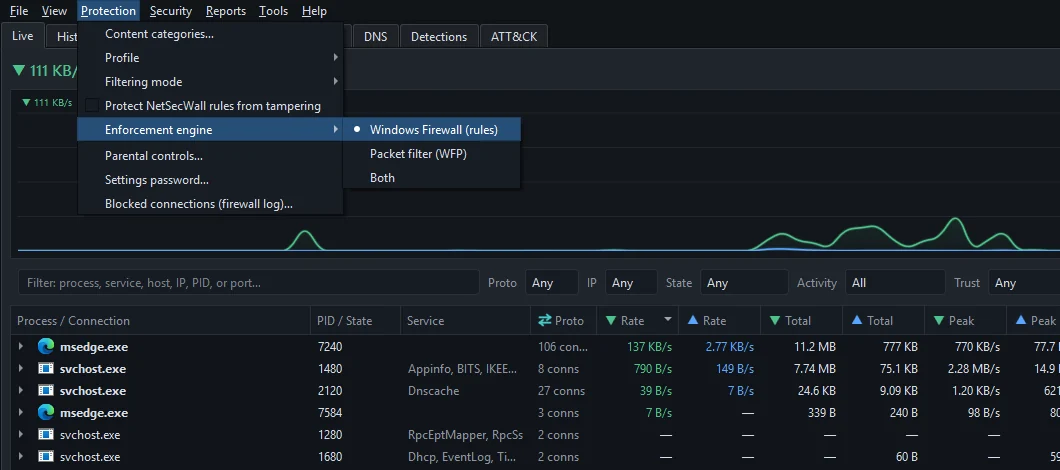
NetSecWall can enforce blocks two ways, chosen under Protection ▸ Enforcement engine. The default, Windows Firewall (rules), writes ordinary Windows Defender Firewall rules. Packet filter (WFP) talks to WFP directly:
- It adds user-mode filters in its own sublayer, named "NetLens Packet Filter", so you can find it in
netsh wfp show filters. No driver is installed. - The filters sit at the auth connect layers for IPv4 and IPv6. They stop outbound connections, which is where every block NetSecWall creates itself applies.
- Each block is one simple filter: a program (identified by its executable path), a remote address, or, for Block all outbound (panic), everything, with a higher-weight permit for traffic to this same PC unless you untick Block-all: allow local (loopback) traffic.
- The filters live in a dynamic WFP session, so Windows removes them automatically the moment NetSecWall stops, even after a crash. NetSecWall also checks every 30 seconds that its filters are still in place and reinstalls them if the Base Filtering Engine was restarted.
- Changes are applied in a single WFP transaction, so there is no gap where old filters are gone and new ones aren't in yet.
WFP blocks appear in the Rules tab with the owner NetSecWall · WFP. They don't appear in wf.msc, because they aren't Windows Firewall rules.
Which engine to pick
| Engine | Where blocks live | While NetSecWall is stopped | Best when | Plans |
|---|---|---|---|---|
| Windows Firewall (rules) | Windows Defender Firewall rules in the "NetLens" group, visible in wf.msc |
Removed, and re-applied when it starts | You want familiar, inspectable rules and Windows Defender Firewall is on | Family, Pro |
| Packet filter (WFP) | NetSecWall's own WFP sublayer | Gone; re-added when it starts | Another tool manages Windows Firewall and may overwrite its rules | Pro |
| Both | Both places | Both removed; both re-applied | You want each block enforced twice | Pro |
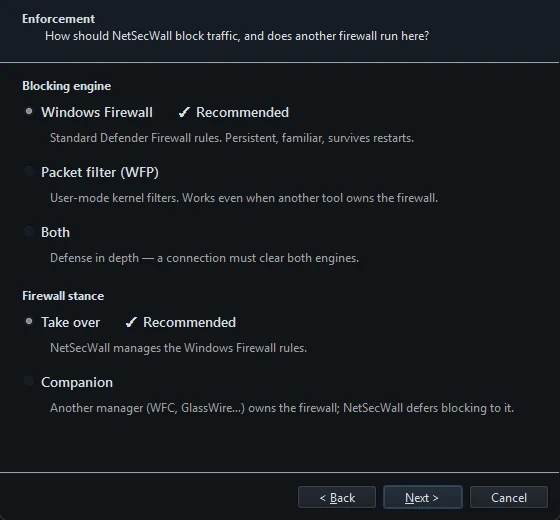
Either way, blocks hold while NetSecWall or its background service runs, and with the service installed that is from boot. The practical guidance:
- Stay on Windows Firewall (rules) unless you have a reason not to. It's the default and the setup wizard recommends it.
- Choose Packet filter (WFP) or Both when another firewall manager is in charge of Windows Firewall. In Companion mode NetSecWall removes its Windows Firewall rules and leaves that firewall to the other tool; the WFP engine keeps enforcing. See using NetSecWall alongside another firewall manager.
- Choose Both for defense in depth: a connection has to get past both engines.
The trial unlocks every engine; after it, the WFP engine is part of Pro (which plan do I need?). Which engine to use has the step-by-step version.
The short version
WFP is the checkpoint system underneath every firewall on Windows, including Windows' own. Simple permit and block filters need no driver; callout drivers are for tools that must look inside or reshape traffic. NetSecWall uses plain user-mode filters, which is why its WFP engine installs nothing in the kernel and vanishes cleanly when it stops. For why outbound filtering matters in the first place, read Windows Firewall allows outbound traffic by default. To try both engines, download the 7-day trial.
Frequently asked questions
Is WFP the same as Windows Defender Firewall?
No. WFP is the filtering engine; Windows Defender Firewall is one product that uses it. Other firewalls, VPNs and security tools add their own filters to the same engine.
Does the Windows Filtering Platform slow my PC down?
Simple filters at the connection layers are checked once per connection, so their cost is small. Heavier callout drivers that inspect every packet can have a noticeable cost, depending on what they do.
How do I find which filter blocked a connection?
Turn on the "Filtering Platform Connection" audit policy and check event 5157 in the Security log. It records the program and the filter's run-time ID, which you can match against netsh wfp show filters.
Why do NetSecWall's WFP filters disappear when it closes?
They're added in a dynamic WFP session, which Windows cleans up when the owning program stops. That's deliberate: a crash can't leave stray filters behind, and the next start re-applies your remembered blocks.
Do I need a driver to use WFP?
Only for callouts. Programs that just permit or block connections, like Windows Defender Firewall's rules and NetSecWall's WFP engine, work entirely through filters and need no driver.
Keep reading
 How to block a country on Windows
Windows has no country switch, so you block the country's IP ranges with firewall rules. NetSecWall does it with one right-click; geolocation is approximate, and CDNs and VPNs blur borders.
How to block a country on Windows
Windows has no country switch, so you block the country's IP ranges with firewall rules. NetSecWall does it with one right-click; geolocation is approximate, and CDNs and VPNs blur borders.
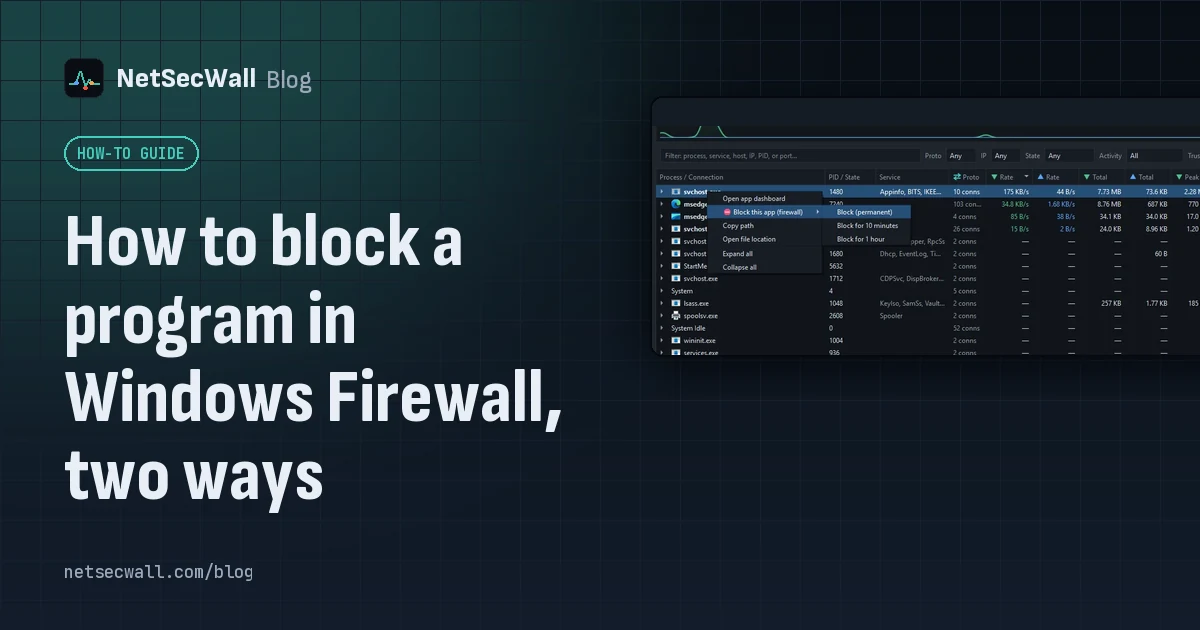 How to block a program in Windows Firewall, two ways
Create an outbound rule for the program's .exe in Windows Defender Firewall with Advanced Security, set to Block the connection. Or right-click the program in NetSecWall and choose Block.
How to block a program in Windows Firewall, two ways
Create an outbound rule for the program's .exe in Windows Defender Firewall with Advanced Security, set to Block the connection. Or right-click the program in NetSecWall and choose Block.
 Keep the app, cut its internet: blocking without uninstalling
Block the program's outbound connections instead of removing it. The app still opens and works offline; it just can't reach the internet until you lift the block.
Keep the app, cut its internet: blocking without uninstalling
Block the program's outbound connections instead of removing it. The app still opens and works offline; it just can't reach the internet until you lift the block.
 Inbound and outbound connections, in plain English
A connection is outbound when your PC starts it, inbound when another machine does. Your router and Windows Firewall stop most unsolicited inbound traffic, so outbound is where apps phone home.
Inbound and outbound connections, in plain English
A connection is outbound when your PC starts it, inbound when another machine does. Your router and Windows Firewall stop most unsolicited inbound traffic, so outbound is where apps phone home.