Windows Firewall rules or the WFP packet filter: which engine to use
NetSecWall enforces blocks with Windows Firewall rules (the default), its own WFP packet filter, or both. Keep Windows Firewall unless another tool keeps overriding NetSecWall's rules.
NetSecWall for WindowsOn this page
NetSecWall can enforce your blocks with Windows Firewall (rules), with its own Packet filter (WFP), or with Both. You choose under Protection ▸ Enforcement engine. For most people the answer to "Windows Firewall or WFP packet filter?" is to stay on the default, Windows Firewall, and switch to the packet filter (or Both) only if another firewall manager keeps overriding NetSecWall's rules. The packet filter and Both are on the Pro plan and the trial.
The three engines side by side
| Windows Firewall (rules) | Packet filter (WFP) | Both | |
|---|---|---|---|
| How it blocks | Adds rules to the built-in Windows Defender Firewall | Adds NetSecWall's own filters to the Windows Filtering Platform (no driver) | Every block is enforced by both; a connection must clear both |
| Plans | Family, Pro, trial | Pro, trial | Pro, trial |
| Shown in the Rules tab as | Owner NetSecWall | Owner NetSecWall · WFP | Both kinds of row |
| Visible in Windows' own firewall console | Yes | No | The Windows Firewall half |
| When another tool manages Windows Firewall | NetSecWall's rules can be switched off or removed | Keeps blocking | The packet-filter half keeps blocking |
| App, category and Block-all blocks | Yes | Yes | Yes |
| Country blocks | Yes | No | Yes |
| Local (loopback) traffic during Block all | Never filtered | Follows the Block-all: allow local (loopback) traffic option | As each engine |
Which plan includes which engine
- Family: Windows Firewall (rules) only. The other two are greyed out with "Not available on your plan — upgrade to unlock this engine."
- Pro and the 7-day trial: all three.
- Monitor and Plus don't include blocking, so no engine applies. See which plan you need.
If the engine you chose isn't on your plan any more — say the trial ends and you buy Family — NetSecWall falls back to one that is.
Windows Firewall or WFP packet filter: which to choose
Windows Firewall (rules) is the default and the one the setup wizard recommends. The rules sit in Windows' own firewall, where you and other tools can see them, and it is the only engine that enforces country blocks.
Packet filter (WFP) is for PCs where something else owns Windows Firewall: another firewall manager that disables or deletes NetSecWall's rules, a third-party firewall that replaces Windows Firewall, or Companion mode, where NetSecWall hands its Windows Firewall rules over to another tool. The filters live in a NetSecWall sublayer named "NetLens Packet Filter" and don't depend on Windows Firewall's rule list. The Windows Filtering Platform explainer covers what that is.
Both is belt and braces. If something switches a firewall rule off, the packet filter still holds the block.
Change the engine
- Open Protection ▸ Enforcement engine.
- Choose Windows Firewall (rules), Packet filter (WFP) or Both.
- If a settings password is set, enter it.
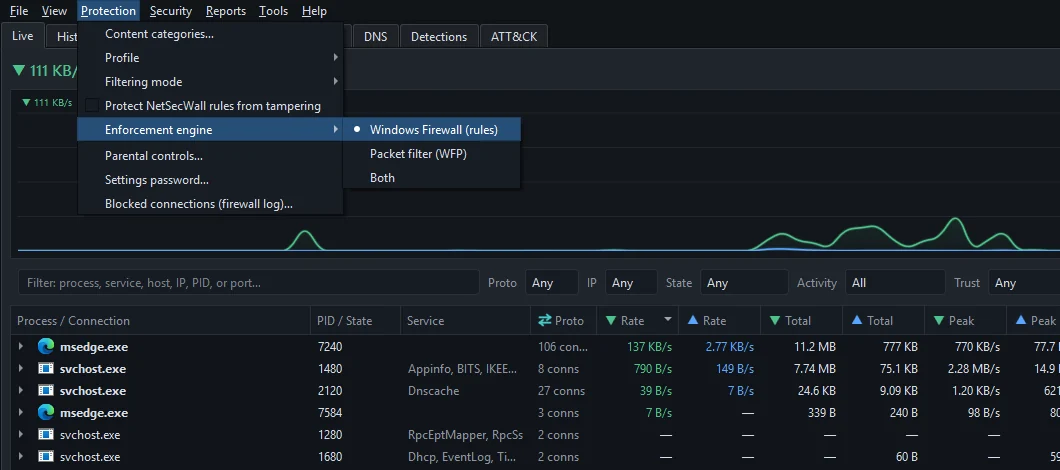
Switching re-applies your rules. The engine you leave removes its blocks, and the one you choose puts every remembered block in place: app blocks, category blocks and Block all, plus country blocks when Windows Firewall comes back into use. The status bar's mode chip shows the result as Engine: Firewall, Engine: WFP or Engine: FW+WFP. The setup wizard (Help ▸ Setup wizard…) offers the same choice on its Enforcement page.
What both engines have in common
- They block outbound connections. Every block NetSecWall makes is outbound. Inbound rules only exist if you create a custom rule.
- They work while NetSecWall runs. NetSecWall removes its Windows Firewall rules when it stops, and its packet filters disappear when its process ends. Both are put back when NetSecWall starts — from boot if the background service is installed.
- Neither reads your traffic. No driver, no packet capture, no decryption; the blocks are made on programs and addresses.
- Parental controls use Windows Firewall. While parental controls are on, the Windows Firewall engine stays active even if you picked the packet filter.
Frequently asked questions
Do my blocks stay in place when I close NetSecWall?
Closing the window sends NetSecWall to the tray, where it keeps enforcing. Quitting lifts its blocks until it starts again, unless the background service is installed, in which case the service keeps them in force.
Can I see the packet-filter blocks in Windows Defender Firewall?
No. WFP filters aren't Windows Firewall rules, so Windows' firewall console doesn't list them. NetSecWall's Rules tab shows them with the Owner NetSecWall · WFP.
Why are Packet filter (WFP) and Both greyed out?
Your plan doesn't include them. Family includes the Windows Firewall engine only; Pro and the trial include all three.
Does the WFP engine install a driver?
No. NetSecWall adds ordinary user-mode filters through the Windows Filtering Platform that is already part of Windows, and they go away when NetSecWall stops.