Why every app connects to Cloudflare, Akamai and Amazon
Most software companies don't serve their apps from their own servers. They rent content delivery networks and cloud platforms, so the address owner you see is usually the host, not the company.
NetSecWall for Windows
On this page
- What a CDN is, and what a cloud edge is
- Why apps connect to CDNs instead of their maker
- The address owner isn't the company you're talking to
- Why country is a weak signal on CDN traffic
- What it means for blocking
- Seeing CDN traffic in NetSecWall
- When a CDN connection deserves a second look
- The short version
If you watch your PC's traffic for five minutes, you'll see apps connecting to Cloudflare, Akamai, Fastly, Amazon and Google, whatever the app is. The answer to why apps connect to CDNs is simple: most companies don't serve their software, updates or websites from their own buildings. They rent space on content delivery networks (CDNs) and cloud platforms, so the network that owns an address is usually the landlord, not the company you're actually dealing with.
What a CDN is, and what a cloud edge is
A content delivery network is a company that runs servers in hundreds of locations and keeps copies of its customers' content close to the people who ask for it. Think of a library system. Instead of every reader travelling to one central library, popular books are stocked in branches all over town. The branches are called edge servers or points of presence.
Cloud platforms such as Amazon Web Services, Microsoft Azure and Google Cloud go further: companies run whole applications there, including login servers, APIs and databases. Many CDNs also sit in front of those applications as a shield, absorbing attacks and spreading the load. Either way, the part of the internet your PC actually touches is often an "edge" run by someone else.
The big names you'll meet: Cloudflare, Akamai, Fastly, Amazon CloudFront (and Amazon's cloud in general), Google, and Microsoft's own network.
Why apps connect to CDNs instead of their maker
A single app can touch a dozen CDN addresses in its first minute, for ordinary reasons:
- Downloads and updates. Installers and patches are large and requested by millions of people at once. CDNs exist for exactly that.
- APIs and sign-in. The app's own back end often runs on a cloud platform, fronted by a CDN.
- Images, fonts and scripts. Anything that looks like a web page inside an app pulls these from a CDN.
- Third-party services. Crash reporting, analytics, ads, payments and chat widgets are separate companies, and they rent CDNs and cloud servers too.
None of this is suspicious by itself. It is how almost all modern software is delivered.
The address owner isn't the company you're talking to
Every IP address belongs to a network, identified by an autonomous system number (ASN). Look up an address and you learn that network's owner, for example AS13335, Cloudflare. That tells you who runs the building, not who lives in it.
One CDN address can front thousands of unrelated websites and services at once. The piece that says which one you're reaching is the name: the domain your app looked up in DNS, which is also sent (usually readable) when the encrypted connection starts. So "an app connected to Amazon" might mean it talked to Amazon, or to a small company whose servers happen to run on Amazon's cloud.
Reverse DNS, the lookup that turns an address back into a name, rarely helps here. It returns the CDN's own naming scheme, not the customer's. Google addresses come back as something.1e100.net, Akamai as …deploy.static.akamaitechnologies.com, Amazon CloudFront as server-…cloudfront.net, and many Cloudflare addresses have no reverse name at all. What your DNS lookups reveal explains why the forward lookup is the one worth reading.
Why country is a weak signal on CDN traffic
CDNs are designed to answer from somewhere near you. Some, like Cloudflare, announce the same addresses from every data center at once, a technique called anycast, so the address has no single location. Others, like Akamai, hand you the address of a nearby server when your app looks up the name.
Geolocation databases, meanwhile, give one country per address range, often the country where the network is registered. So a connection shown as "US" may be served from a data center in your own city, and a site hosted in one country may reach you from an edge in another. How accurate IP geolocation is goes into the details. The practical rule: on CDN traffic, trust the name and the app, not the flag.
What it means for blocking
Because CDN addresses are shared, blocking them is blunt:
- Blocking a single Cloudflare or Amazon address can break unrelated sites that happen to share it.
- Blocking a CDN's whole network would break a large part of the web.
- A country block won't stop a site that reaches you through an edge server outside that country.
NetSecWall says as much in its settings: content-category blocking is reactive and IP-based, so the first packets to a brand-new address may pass, and shared CDN addresses can over-block. When you want an app to stop talking, block the app. When you want a kind of site gone, use website categories and accept that they work on addresses, not URLs.
Seeing CDN traffic in NetSecWall
The Live tab shows names first and networks second, which is the right order for CDN traffic:
- Remote host shows the name found for the address, from the DNS lookup that led to it or, failing that, from reverse DNS. If there's no name at all and the address belongs to a CDN, it shows the network in brackets, such as (Cloudflare).
- Switch View to By IP, By Domain or By Country to get a Network / CDN column for every group, with the apps using it underneath.
- In those grouped views, tick CDN only in the filter bar to keep just CDN and cloud-edge networks, or leave it off and scan for what isn't one.
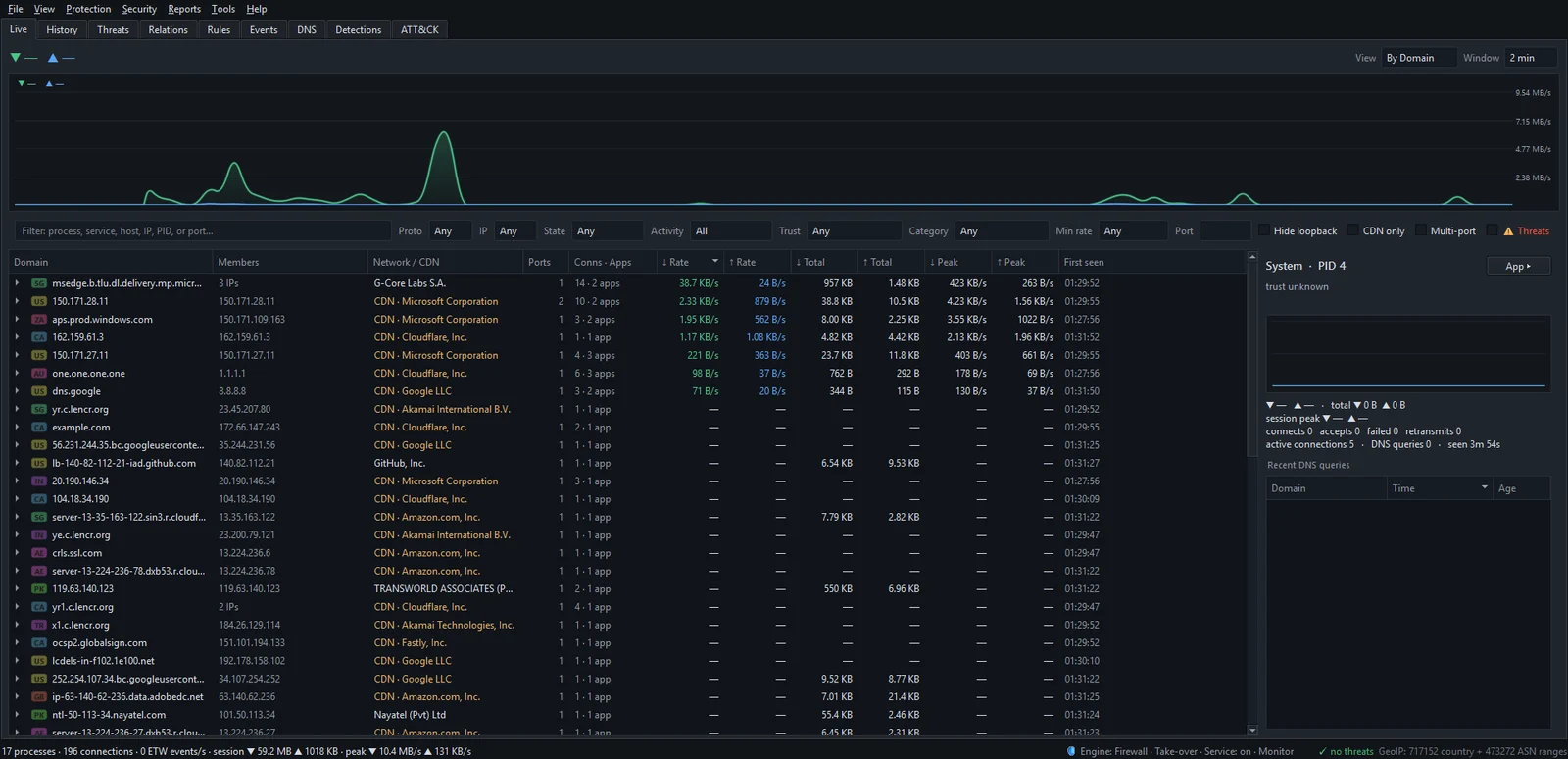
Select a connection and the details pane shows its network, for example AS13335 Cloudflare (CDN). Double-click a row in the By IP view, or right-click a connection and choose Open IP dashboard, and the IP dashboard shows its reverse DNS name, its network with a CDN / cloud edge label, and every app that has talked to it. The IP dashboard explains each part.
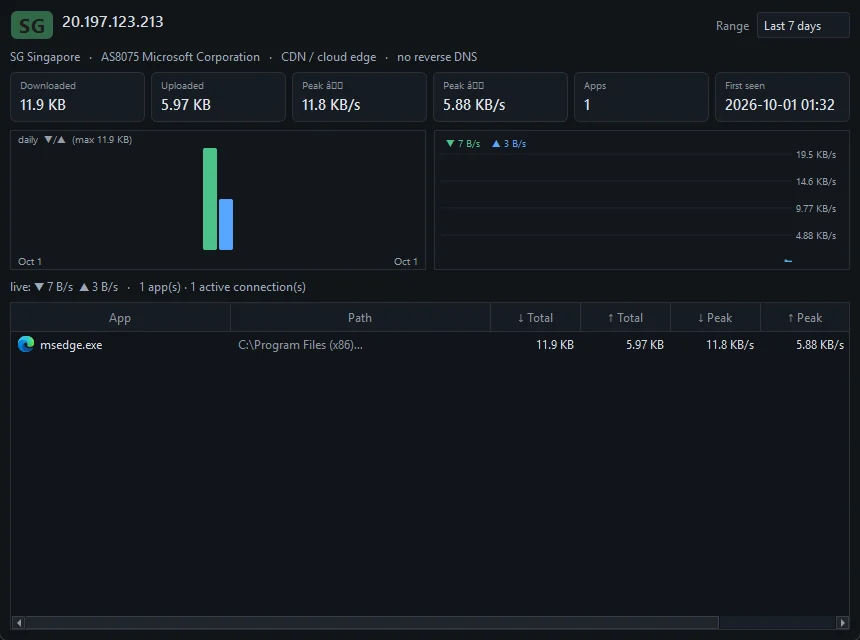
Network names and the CDN label come from a built-in table of well-known networks, including Cloudflare, Akamai, Fastly, CloudFront, Amazon, Google and Microsoft. General hosting companies, where anyone can rent a server, are shown by name but not labelled as CDNs. To see which apps share the same provider, open the Relations tab and set Relate apps by to ASN / Network; see the Relations graph.
When a CDN connection deserves a second look
The CDN is almost never the clue. The app is. Things worth a closer look:
- An unsigned program, or one running from Downloads or a temp folder, making connections of any kind.
- A program connecting to bare addresses without looking up a name first.
- Small connections to one address on a steady timer, day and night.
- Traffic to a general hosting provider from a program that has no reason to use one.
Malware rents cloud servers and hides behind CDNs too, so "it's only Amazon" isn't a clean bill of health either. How to spot malware by its network traffic covers these patterns.
The short version
When an app connects to Cloudflare, Akamai or Amazon, it's usually talking to its own maker through a rented front door. Read the domain name and the app for who and why; read the network for where it's hosted; mostly ignore the country. To see the names behind your own CDN traffic, download the 7-day trial and switch the Live tab to By Domain.
Frequently asked questions
Is it normal for Windows to connect to Akamai?
Yes. Microsoft, like most large software companies, delivers updates and content through CDNs, so Windows and Microsoft apps connecting to Akamai or other edge networks is expected.
Why does an app I've never opened connect to Amazon?
Background updaters, helper services and sync agents run without their main window. If their maker's servers run on Amazon's cloud, the traffic shows up as Amazon. Check the app name and the domain it looked up.
Can I block Cloudflare or Amazon entirely?
You can with a firewall rule on their address ranges, but a large share of websites and apps would stop working. Blocking the specific app or the specific category of site is far less disruptive.
Why does reverse DNS show a name like 1e100.net?
That is Google's naming scheme for its own servers. Reverse DNS names belong to whoever runs the network, so for CDN addresses they describe the CDN, not the website or service you reached.
Does a CDN see my traffic?
A CDN that fronts a site handles that site's connections, so it can see the requests it serves. That is part of the service the site bought, and it's a question of whom the site chose to trust, not something your PC controls.
Keep reading
 How accurate is IP geolocation?
IP geolocation is usually right about the country and often wrong about the city. It's an educated guess from registry records and network measurements, and CDNs, anycast and VPNs throw it off.
How accurate is IP geolocation?
IP geolocation is usually right about the country and often wrong about the city. It's an educated guess from registry records and network measurements, and CDNs, anycast and VPNs throw it off.
 How NetSecWall sees every connection without a driver
NetSecWall reads what Windows already records: kernel network events through ETW, DNS answers, and the TCP and UDP tables. It sees which app talks to which address without capturing a single packet.
How NetSecWall sees every connection without a driver
NetSecWall reads what Windows already records: kernel network events through ETW, DNS answers, and the TCP and UDP tables. It sees which app talks to which address without capturing a single packet.
 Encrypted DNS (DoH): what it hides, and from whom
DNS over HTTPS encrypts the names your PC looks up, so the Wi-Fi owner and your ISP can't read them. The resolver you use still sees every name, and the addresses you then connect to stay visible.
Encrypted DNS (DoH): what it hides, and from whom
DNS over HTTPS encrypts the names your PC looks up, so the Wi-Fi owner and your ISP can't read them. The resolver you use still sees every name, and the addresses you then connect to stay visible.
 How to find which app is using a port on Windows
Run netstat -ano to get the process ID (PID) that owns the port, then look that PID up in Task Manager. PowerShell's Get-NetTCPConnection and Resource Monitor give the same answer.
How to find which app is using a port on Windows
Run netstat -ano to get the process ID (PID) that owns the port, then look that PID up in Task Manager. PowerShell's Get-NetTCPConnection and Resource Monitor give the same answer.