Turn analytics off, and export or delete your data
Analytics are off unless you turned them on. Help ▸ Privacy & telemetry… switches them off, shows what is held for your install ID, and erases it. Your traffic history only ever lives on your PC.
NetSecWall for WindowsOn this page
NetSecWall's usage analytics are off unless you turned them on, either in the last page of the setup wizard or later. Everything about them is in one place, Help ▸ Privacy & telemetry…: untick Send anonymous usage analytics to turn off NetSecWall analytics, click Export my data to see what the server holds for your anonymous install ID, and Delete my data to erase it. Your traffic history is a separate matter: it never leaves your PC, and you remove it there. Your data and your privacy gives the overview.
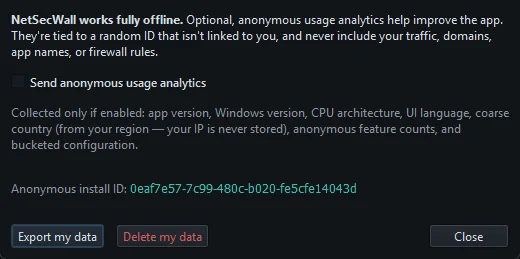
Turn off NetSecWall analytics
- Open Help ▸ Privacy & telemetry… (Alt+H, then choose it).
- Untick Send anonymous usage analytics.
- Click Close.
The change takes effect the moment you untick the box: anything queued is dropped and nothing more is sent. NetSecWall sends one small record of your choice (install ID and "off"), so the server has a record that you withdrew consent.
After you opt out, you may see a one-time "Analytics are off" note that mentions the price of a plan, with See plans ↗ and Not now. It appears at most once, never if you are signed in, and neither button changes your choice. Saying no to analytics doesn't shorten the trial, lock a feature or change a price.
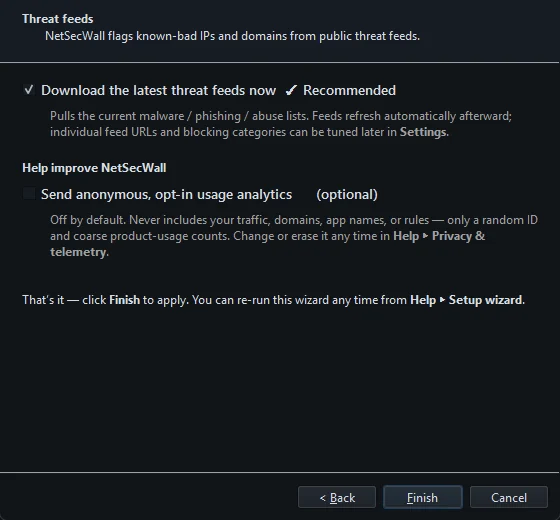
The same option appears on the last page of the setup wizard, where it starts unticked:
What analytics contain when they are on
- A random install ID that is not linked to your name, email or license.
- App version, Windows version and build, CPU architecture and UI language.
- A coarse country taken from your Windows region setting. Your IP address is not stored.
- Counts of coarse events, such as the app starting, the setup wizard being completed, or how you answered a Learning-mode pop-up, without the program's name.
- Bucketed settings, such as which enforcement engine and filtering mode you use and whether the background service is installed.
They never include your traffic, domains, program names or firewall rules. Events are sent in batches every five minutes and kept for at most 425 days. For every other request the app makes, see Exactly what NetSecWall sends over the internet.
Export my data
- Open Help ▸ Privacy & telemetry….
- Click Export my data.
- In the "Your telemetry data" box, click Show Details to read everything the server holds for your install ID, as JSON.
This needs an internet connection. If analytics were never on, expect little or nothing.
Delete my data
- Open Help ▸ Privacy & telemetry….
- If analytics are on, untick Send anonymous usage analytics first, so nothing new arrives afterwards.
- Click Delete my data.
- Confirm "Erase everything tied to your anonymous install ID from the NetSecWall backend? This cannot be undone." with Yes.
The status bar confirms with "Your telemetry data was deleted."
These buttons cover the install ID only. Your account, devices and license records are tied to your email, not to the install ID. To access or erase those, open a support ticket and choose the Privacy & my data topic; requests are answered within 30 days. Order records are kept as long as tax law requires, typically seven years.
Delete the data kept on your PC
Traffic history, the DNS log, rules and settings are stored only on your PC.
Prune old history
There is no retention setting. At most once a month, if the database holds traffic older than 30 days, NetSecWall asks: "Prune everything older than 30 days?" Click Prune now to delete it or Keep everything to leave it; nothing is deleted unless you choose to. First-seen dates for programs and addresses are kept either way. History, search and reports explains what the history holds.
Remove everything by uninstalling
- Open Windows Settings ▸ Apps ▸ Installed apps (Apps & features on Windows 10), find NetSecWall and choose Uninstall.
- When asked "Also delete your NetSecWall settings, history and downloaded lists from this PC?", choose Yes.
That deletes C:\ProgramData\NetLens, %LOCALAPPDATA%\NetLens and the settings under HKCU\Software\NetLens. A silent uninstall keeps data unless you add /PURGE=1. Your license stays bound to the device on the server either way. How to uninstall NetSecWall has the details.
Click Delete my data before you uninstall with data removal. The install ID is stored in the settings that get deleted, and a reinstall creates a new one, so the app could no longer ask for the old ID's data to be erased.
Frequently asked questions
Are NetSecWall analytics on by default?
No. They stay off unless you tick Send anonymous usage analytics in the setup wizard or in Help ▸ Privacy & telemetry….
Does turning analytics off change anything in the app?
No. NetSecWall works exactly the same, and the trial, features and prices don't depend on your answer.
Does Restore factory defaults delete my history?
No. Restore factory defaults… in Settings resets detection rules, feed URLs, alerts and other settings, but keeps your traffic history, license, downloaded lists and settings password.
Does Delete my data remove my license or my history?
No. It erases the analytics data held for your install ID on NetSecWall's server. Your license is unaffected, and your history is on your PC, where only pruning or an uninstall with data removal deletes it.