See which domains each app looks up
Open the DNS tab to see every domain each program looked up, how many times, and when it first and last did. Encrypted DNS inside a browser is the one common case it can't see.
NetSecWall for WindowsOn this page
Before a program connects to example.com, it asks DNS for the address. NetSecWall records those DNS lookups per app, so the DNS tab can tell you which domains each program looked up, how often, and when. For the program you are looking at right now, the details pane on the Live tab shows its Recent DNS queries. The log is kept in NetSecWall's history database on your PC and is not sent anywhere.
Open the DNS tab
- Click the DNS tab.
- Pick a Range: Today, Last 7 days (the default), Last 30 days or All time.
- To narrow it down, type in the Filter (app or domain)… box. It matches any part of a program name or domain.
- Click a column header to sort, for example Queries for the most-looked-up names or Last seen for the newest.
The line next to the filter box counts what is shown, in the form "N domain(s) · N queries".
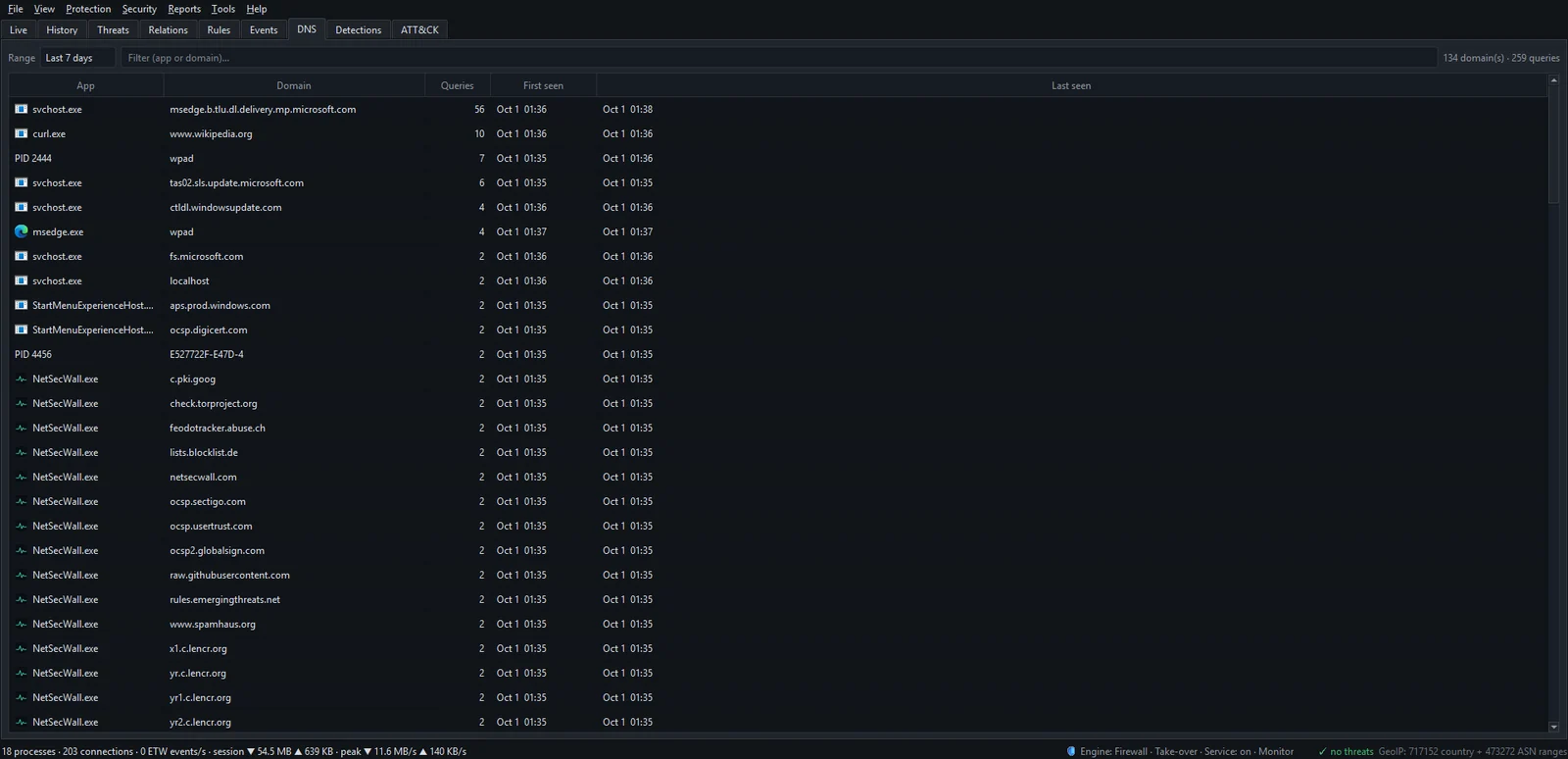
Reading the DNS lookups per app
Each row is one program and one domain:
| Column | Meaning |
|---|---|
| App | The program that asked. Hover over it for its full path. |
| Domain | The name it looked up. |
| Queries | How many times it asked for that name in the range. |
| First seen / Last seen | The first and last lookup in the range. |
A lookup is recorded whether or not a connection followed it, so the log also shows names a program only checked or prefetched, and names that led to a connection NetSecWall's rules blocked. Each range shows up to 5,000 program and domain pairs, most-queried first; pick a shorter range if you need the rest.
Recent DNS queries in the details pane
On the Live tab, select a program and look at the bottom of the details pane. Recent DNS queries lists its latest lookups with Domain, Time and Age, newest first. It combines every running process of the same program, because browsers and other multi-process apps often look names up in a helper process rather than the one you selected.
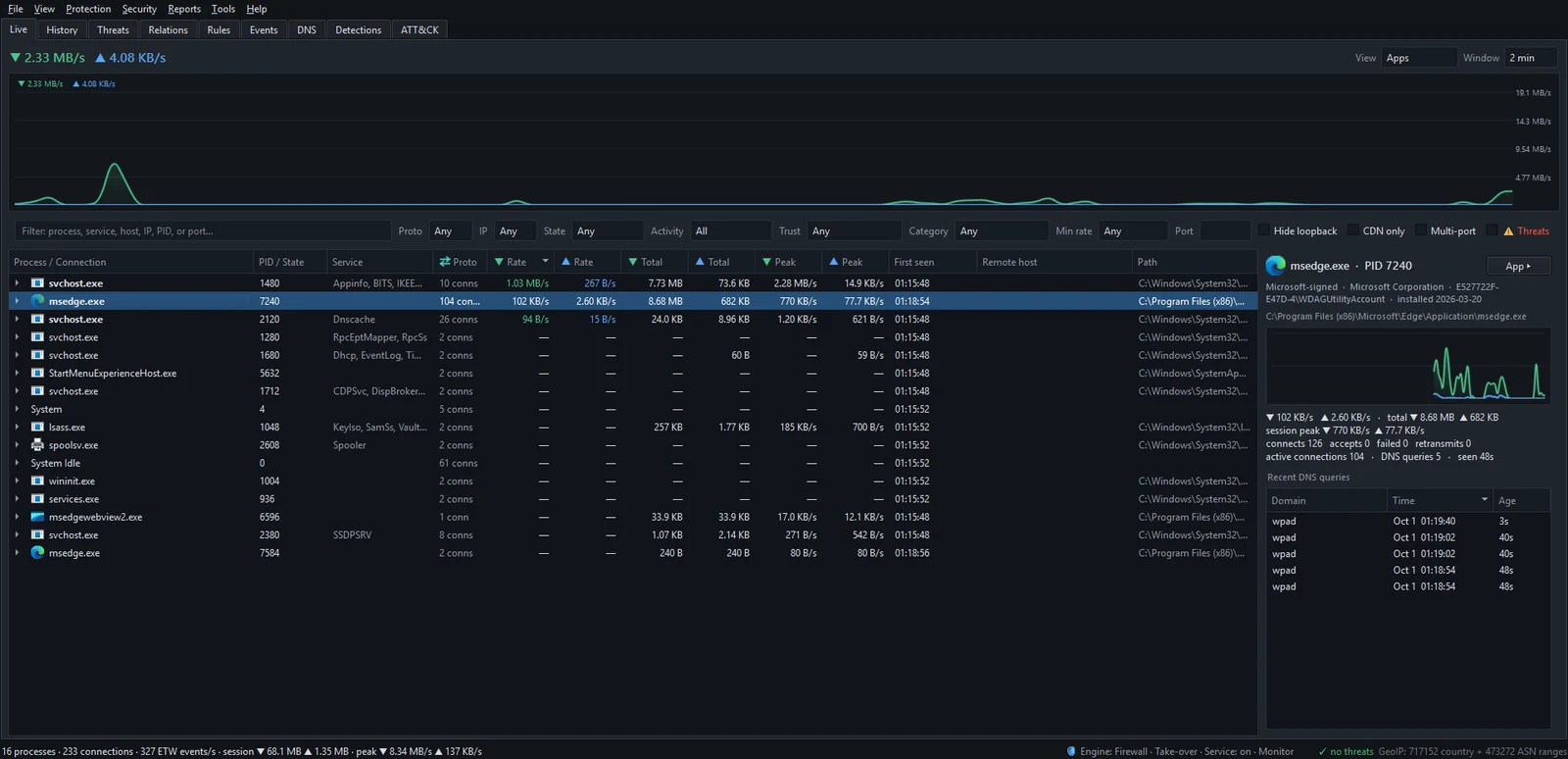
What the DNS log can't see
NetSecWall reads lookups from the Windows DNS client, the part of Windows that answers name requests for programs. That leaves some gaps:
- Encrypted DNS inside a browser. When a browser uses DNS over HTTPS (DoH) itself, the names are encrypted inside its own connection. You'll see the browser's connection to the DNS provider in the Live tab, but not the names. Encrypted DNS (DoH): what it hides, and from whom explains why.
- Programs that do their own DNS. Anything that sends its own queries instead of asking Windows bypasses the log in the same way.
- Anything before NetSecWall started. Lookups made while NetSecWall wasn't running aren't recorded. The background service closes that gap.
- Pages and URLs. DNS carries names only. The log shows
news.example.com, never which article you read.
NetSecWall does not filter, block or encrypt DNS on Windows. It only records what the Windows DNS client resolved. To block a domain, add it to a content category that is set to Block; see Block a specific domain or website.
What to use it for
- Find who contacted a name. Type a suspicious domain in the filter to see every program that looked it up.
- See what an app talks to in the background. Filter by the program's name and sort by Queries. Telemetry and update checks show up as names repeated many times a day.
- Explain a connection with no name. If the Live tab shows a bare address, check here for a lookup at the same time.
What your DNS lookups reveal about the apps on your PC has more ideas.
Frequently asked questions
Why doesn't my browser's browsing show up in the DNS tab?
Most likely the browser is using its own encrypted DNS (DoH), often labeled "secure DNS" in its settings. The lookups then travel inside an encrypted connection that NetSecWall can see but not read, so only the connection to the DNS provider appears.
Can I export the DNS log?
The DNS tab has no export button. Export… on the History tab exports traffic totals, not DNS lookups.
Is the DNS log sent to NetSecWall?
No. It is stored in the history database on your PC, together with the rest of your traffic history. See Exactly what NetSecWall sends over the internet.
How far back does the DNS log go?
As far back as your history does. NetSecWall keeps history until you accept the monthly offer to prune data older than 30 days, and All time shows everything still stored.