Exactly what NetSecWall sends over the internet
Your traffic history, DNS log and rules never leave the PC. NetSecWall contacts netsecwall.com for its license check, its reference lists and update checks; everything else is opt-in or on click.
NetSecWall for WindowsOn this page
NetSecWall watches your traffic on your PC and keeps what it learns there. Your traffic history, DNS log, rules and detections are never uploaded. The app itself talks to netsecwall.com for three routine jobs: the license check, downloading its reference lists (threat, category and GeoIP data), and checking for updates. Everything else it sends is either something you switched on or something you clicked. For the wider picture, see Your data and your privacy.
What never leaves your PC
- Your traffic history: which programs connected where, when and how much.
- The DNS log: which names each program looked up.
- Your firewall rules, allow and block decisions, whitelists and detection rules.
- Content-category and parental-control settings, and the settings password (stored only as a hash).
- Alerts, detections and incidents.
Threat, category and GeoIP lists are downloaded to the PC and matched there. No address, domain or program name is sent anywhere to be looked up.
What data NetSecWall sends, request by request
| Request | When | What it carries | Where it goes |
|---|---|---|---|
| License check | At start, then once a day, during the trial too | A one-way device hash, app version, Windows version, the PC's name, a coarse country from your Windows region setting, the names of paid features in use (such as "blocking"), and your account token if you signed in | netsecwall.com |
| Sign in / activate | Only when you do it | Signing in: your email and password, the device hash and the PC's name. Activating a key: the key plus the same details as the license check | netsecwall.com |
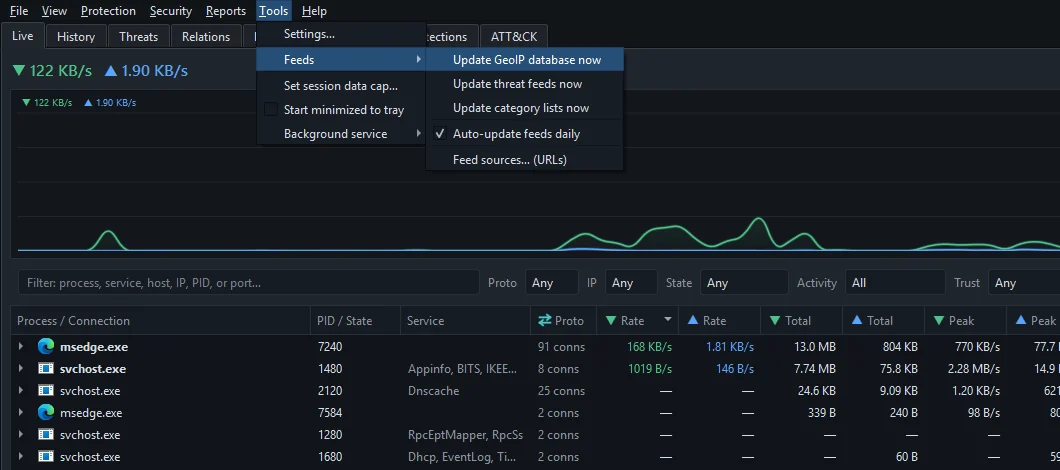
| Reference lists | About once a day (checked every 3 hours), or when you use Tools ▸ Feeds | A request for the six threat lists, the category lists and the GeoIP/ASN tables, identified by the device hash | netsecwall.com; if a list isn't there, its public source |
| Update check | About 20 seconds after launch, then every 6 hours, or Help ▸ Check for updates… | Your current version, the update channel and the device hash | netsecwall.com |
| Update download | Only after you click Download & install… | The same device hash | netsecwall.com |
| Account link | Only when you choose Help ▸ Open my account in browser… | A request for a one-time sign-in link for your account | netsecwall.com |
The device hash is a one-way SHA-256 fingerprint of hardware identifiers; the raw identifiers never leave the PC. It is what lets the trial work without an account. According to the privacy policy, the server stores a salted hash of your IP address that changes daily rather than the address itself, keeping a raw IP only when there are signs of abuse such as key sharing.
Two of these can involve other parties:
- Public list sources. When NetSecWall's server doesn't have a list, the app downloads it from its public source instead (for example GitHub, abuse.ch or Spamhaus), which sees your IP address as any download would. The threat-intelligence feeds NetSecWall uses lists them.
- Verify this PC. Occasionally the server asks you to confirm a person is using the PC before it serves lists or accepts a sign-in. The check opens in your browser and uses Cloudflare Turnstile, which processes your IP address and browser details to tell people from bots.
To turn off automatic list updates, untick Tools ▸ Feeds ▸ Auto-update feeds daily. To stop automatic update checks, untick Check for updates automatically under Tools ▸ Settings… ▸ Updates.
Only if you switch it on
| Feature | Off by default? | What is sent | Where |
|---|---|---|---|
| Anonymous usage analytics | Yes | A random install ID, app version, Windows version and build, CPU architecture, UI language, coarse country, feature counts and bucketed settings, in batches every 5 minutes | netsecwall.com, kept at most 425 days |
| VirusTotal hash check | Yes, needs your own API key | The SHA-256 hash of a program that uses the network, never the file | VirusTotal |
| Newly-registered domain check | Yes | Domain names contacted by programs that were already flagged | An RDAP service (rdap.org by default) |
| Remote alerts | Yes | The alert text | ntfy.sh (your topic) or your HTTPS webhook |
Changing the analytics checkbox also sends one small record of your choice (install ID, on or off, coarse country), and Export my data and Delete my data send the install ID so the server knows whose data to return or erase. Turn analytics off, and export or delete your data covers those. The other three live in Tools ▸ Settings… ▸ Alerts & Detection.

Things that open in your browser
Some menu items simply open a web page, and then it is your browser, not NetSecWall, that makes the request:
- Investigate IP ▸ opens VirusTotal, AbuseIPDB, IPinfo or Shodan with the chosen address in the web address. See The IP dashboard and one-click IP investigation.
- Clicking a technique on the ATT&CK tab opens attack.mitre.org.
- See plans, Choose a plan, Create an account and similar buttons open netsecwall.com.
Managed PCs
On a PC enrolled in an organization's Management Server (Enterprise, in beta), the license comes from that server, which your organization runs, and the app checks in with it instead of sending the license check to netsecwall.com. The client sends it no events or detections. The app still runs its update check against netsecwall.com and may download lists from there.
You can watch NetSecWall do all of this. Type NetSecWall in the Live tab's filter box to see its own connections, and look for netsecwall.com in the DNS tab.
Frequently asked questions
Does NetSecWall work without an internet connection?
Yes, once it is activated. It needs to reach the server once to start the trial or activate a key, then keeps working offline on the cached license. Lists and updates simply wait until you are back online.
Does NetSecWall upload my browsing history?
No. Browsing shows up in NetSecWall as connections and DNS lookups, and both stay in the database on your PC. Nothing about a connection is sent anywhere to be checked.
Why does the license check include my PC's name?
So you can tell your devices apart in your account's device list on netsecwall.com. The same data is sent during the trial, when there is no account, because the device hash is what makes the trial work.
Does the Android app send anything to NetSecWall?
Nothing about your browsing. NetSecWall for Android (beta) has no account of its own and no analytics. It is linked to your PC once with a one-time code, and then checks with netsecwall.com once a day that the PC's plan is still active. For that link netsecwall.com keeps a link id, a hash of the phone's secret, the phone's model name (shown in your PC's list), the app version, and when it was linked and last checked, but no IP address. The app also downloads its blocklists and a daily update check from netsecwall.com, which see your IP address and the app's version like any download. DNS lookups go to the resolver you choose, the camera is used only to scan the PC's code on the phone, and it contacts other hosts only for lists you add yourself. See the Android section of the privacy policy.