Your data and your privacy: what NetSecWall keeps and sends
Your traffic history, DNS log and rules stay on your PC. NetSecWall sends a license check, downloads its lists and checks for updates; analytics are off unless you turn them on.
NetSecWall for WindowsOn this page
A tool that watches every connection your computer makes is exactly the kind of tool you should be suspicious of. So here's the whole picture of NetSecWall privacy and data: your traffic data never leaves the PC; a license check and list downloads do; analytics only if you switch them on. The privacy policy is the formal version. This is the plain one.
What stays on your PC
- Every connection NetSecWall records: programs, addresses, host names, ports, byte counts and times.
- The DNS log: which names were looked up, and by which program.
- Your rules, whitelists, category settings and parental controls.
- Alerts, detections and incidents.
There is no upload path for traffic data in the product. NetSecWall also never decrypts anything: it records that a connection happened and how big it was, never what was inside it.
Where it's stored
| What | Where |
|---|---|
The history database (netlens.db), downloaded lists, detection rules, your IOC list |
C:\ProgramData\NetLens with the background service (readable only by SYSTEM and Administrators), or %LOCALAPPDATA%\NetLens\NetLens without it |
| Settings, the license cache, Learning-mode decisions, parental settings, the password hash | The registry, under HKCU\Software\NetLens\NetLens |
"NetLens" is NetSecWall's old internal name, kept in these paths on purpose.
What leaves, and why
| Goes to | Carries | When |
|---|---|---|
| License check (netsecwall.com) | A one-way device hash, app version, Windows version, PC name, coarse country from your Windows region setting, the paid features in use, and your account token if you've signed in | At start and once a day |
| List downloads (netsecwall.com, or the public source as a fallback) | The device hash, to authenticate the download. Nothing about your traffic. | When lists are refreshed |
| Update check | Your version, update channel and device hash | Shortly after launch and every few hours, if automatic checks are on |
| Verify this PC | A one-click check in your browser, if the server asks for one | Rarely; it lasts for weeks |
The device hash is a SHA-256 fingerprint of hardware and Windows identifiers; the raw values never leave the PC. Your email and password are sent only when you sign in, and a license key only when you activate one.
Threat, category and GeoIP lists are downloaded and matched on the PC, so your browsing is never the query. Exactly what NetSecWall sends lists every connection.
Only if you switch them on: anonymous usage analytics, VirusTotal checks (the file hash only, with your own key), domain-age lookups for flagged apps, and phone or webhook alerts.
Analytics are opt-in
The last page of the setup wizard offers "Send anonymous, opt-in usage analytics", unticked. Left alone, it stays off. When on, it sends a random install ID, app and Windows version, CPU architecture, UI language, coarse country, feature counts and bucketed configuration. Never your traffic, domains, app names or firewall rules. The server only accepts a fixed list of event names and drops anything else. Declining doesn't change a feature or a price.
Change it any time in Help ▸ Privacy & telemetry…. It applies instantly, in both directions.
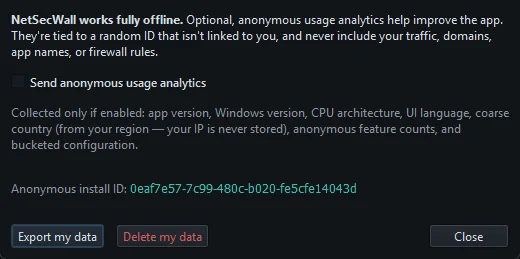
Export or delete your data
- Open Help ▸ Privacy & telemetry….
- Click Export my data to see everything the NetSecWall backend holds for your anonymous install ID.
- Click Delete my data to erase it. This can't be undone.
For account and order data, raise a privacy request. It's answered within 30 days as the law requires, usually far sooner. Order records are kept as long as tax and accounting law requires; everything else tied to you is erased on request. See turning analytics off and deleting data.
Trimming or removing local data
History isn't deleted on a timer. At most once a month, if you have data older than 30 days, NetSecWall offers to prune it, and nothing is deleted unless you click Prune now (history and reports).
Restore factory defaults… in Settings resets rules and settings to their defaults but keeps your history, downloaded lists, license, theme and password. To remove everything, uninstall and answer Yes to "Also delete your NetSecWall settings, history and downloaded lists from this PC?" The default is No, because people reinstall and expect their history back. See uninstalling NetSecWall.
On a managed work PC
If your organization manages the PC with the NetSecWall Management Server (Enterprise, in beta), your license and policy come from its server. NetSecWall's acceptable use policy requires organizations to have a lawful basis and to tell their users.
Frequently asked questions
Does NetSecWall sell or share my browsing data?
It doesn't have it. Browsing and traffic data stay on your PC; the only things that leave are listed above.
Does NetSecWall work the same without analytics?
Yes. Analytics are off by default, and switching them off never locks a feature or changes a price.
Can NetSecWall work offline?
Yes. It needs the internet once, to start the trial or activate a key. After that it runs on its cached license until that expires; list and update checks simply wait.
Does a factory reset delete my history?
No. It restores detection rules, feed sources, alert settings and similar to their defaults, and keeps history, lists, license, theme and the password.