How accurate is IP geolocation?
IP geolocation is usually right about the country and often wrong about the city. It's an educated guess from registry records and network measurements, and CDNs, anycast and VPNs throw it off.
NetSecWall for Windows
On this page
IP geolocation accuracy depends on what you ask it. For the country, the answer is right most of the time for ordinary home and business connections. For the city, it is often a guess, sometimes off by a whole region. And for addresses run by CDNs, cloud platforms and VPNs, even the country can describe where a network is registered rather than where the server that answered you sits. Nobody can look up where an address "is"; every database is an educated estimate built from records and measurements.
How IP geolocation databases are built
There is no official map of where every address lives. Geolocation companies assemble one from several kinds of evidence:
- Registry records. Five regional internet registries (ARIN, RIPE NCC, APNIC, LACNIC and AFRINIC) hand out blocks of addresses and record who holds each one, with a country. That country is where the holder is registered, which is usually, but not always, where the addresses are used.
- Routing data. The internet's routing system (BGP) shows which network announces each block, which ties addresses to an operator.
- Measurements. Signals can't travel faster than light, so the delay between known measuring points and an address limits how far away it can be. Traceroutes also pass through routers whose names often include a city or airport code.
- Published feeds. Many network operators publish their own list of address ranges and locations in a standard format called a geofeed (RFC 8805).
- Corrections and other data. Vendors take corrections from users and operators, and some commercial ones also buy location data gathered from devices.
Each vendor weighs these differently, which is why two geolocation sites can disagree about the same address.
IP geolocation accuracy: country versus city
The country is the easy part. Most address blocks are handed to organizations in a single country and used there, and the registry record says so. When a home broadband address in France comes back as France, that's the registry and the measurements agreeing.
The city is much harder. Internet providers assign addresses from regional pools, route customers through regional hubs, and reshuffle blocks as they grow. Your address might be "located" at your provider's hub in the nearest big city, or at a default point in the middle of the country. Mobile carriers and satellite services route traffic through gateways that can be hundreds of kilometers from the user. That's why a website sometimes greets you with a city you've never lived in.
Vendors do publish their own accuracy figures, and their city figures are well below their country figures. For anything that matters, treat city as a hint and country as a reasonable but fallible label.
Where geolocation goes wrong
The country itself is least reliable exactly where most of your traffic goes:
- Anycast. Some services announce the same address from dozens of data centers at once. Cloudflare's 1.1.1.1 and Google's 8.8.8.8 answer from a location near you, but a database can only give each address one country, often the one where the network is registered.
- CDNs and cloud platforms. Content is served from edge servers close to you, and cloud providers move address ranges between regions. Why every app connects to Cloudflare, Akamai and Amazon covers why the address owner isn't the company you're talking to.
- Multinational networks. A company registered in one country may use its addresses in many others.
- VPNs and proxies. A server behind a VPN or proxy shows the location of the exit, not the real machine. The same applies on your side: with a VPN or proxy on, some connections from your PC show the VPN server as their destination.
- Stale data. Address blocks are sold and moved between networks and countries. Databases catch up, but not instantly.
The database NetSecWall uses
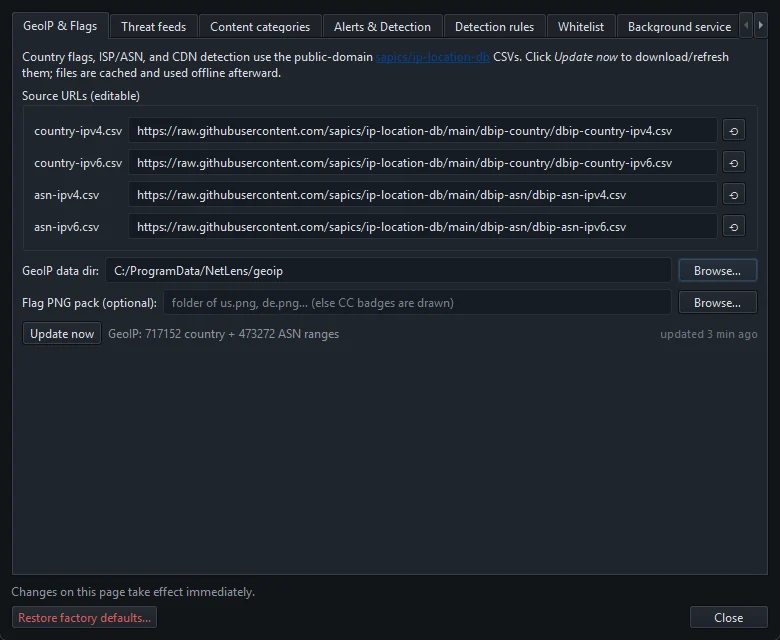
NetSecWall looks up country and network owner (ASN) for every remote address, IPv4 and IPv6, using the free db-ip.com "lite" tables, licensed under Creative Commons Attribution (CC-BY) and packaged by the open ip-location-db project. Since version 1.2.0 NetSecWall downloads them from its own mirror on every plan, falling back to the public source if needed.
A few things follow from that choice:
- Country only. NetSecWall doesn't show cities at all, because the lite tables don't claim that level of detail and because city answers would suggest more precision than exists.
- Matched on your PC. The tables are downloaded and searched locally. No address is sent anywhere to be looked up.
- Kept current automatically. With Tools ▸ Feeds ▸ Auto-update feeds daily on (the default), NetSecWall refreshes its copy once it is more than about 20 hours old. Tools ▸ Feeds ▸ Update GeoIP database now does it on demand.
The source URLs, the data folder and an optional flag-image pack are under Tools ▸ Settings… ▸ GeoIP & Flags. Without a flag pack, countries appear as two-letter code badges. If the tables stop updating, see GeoIP, threat or category lists aren't updating.
What it means for country blocks
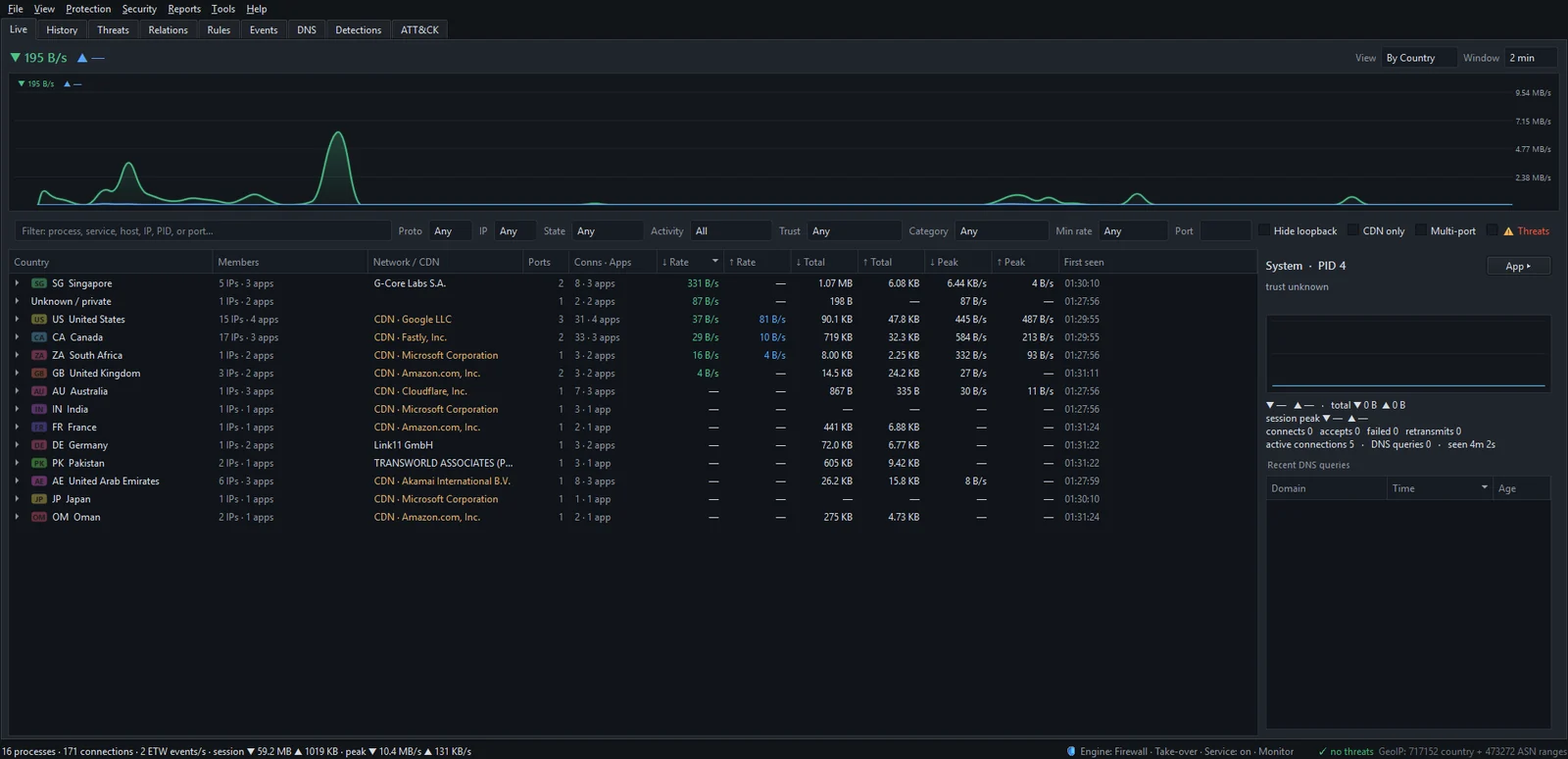
NetSecWall can block a country. In the Live tab, switch View to By Country, right-click a country and choose ⛔ Block all IP ranges of followed by its code. NetSecWall creates Windows Firewall rules named NetLens Geo Block: plus the code, covering every range the table assigns to that country. Block a country's IP ranges has the full procedure.
Knowing how geolocation works tells you what such a block can and can't do:
- It blocks addresses, not companies or websites. A service based in that country but delivered through a CDN edge elsewhere won't be blocked. A site based elsewhere but served from an edge inside that country may be.
- Big registration countries are risky. Many global CDNs and cloud platforms have large ranges registered in the United States. Blocking the US would break a large part of the web.
- It's outbound. Like every block NetSecWall creates itself, it stops your PC connecting out to those ranges.
- VPNs get around it. Traffic that leaves through a VPN server in another country is judged by that server's address.
- It's only as fresh as the table. Keep the feeds updating.
Country blocking works best as a blunt tool for traffic you never expect, not as a precise privacy control. How to block a country on Windows looks at when it's worth doing.
Reading the country column sensibly
The country is the weakest signal on a connection row. Read it together with the domain name, the Network / CDN column and the app. A connection to a CDN "in" another country usually means nothing. An unsigned program talking to a bare address in a hosting network is interesting wherever that address is. NetSecWall has an optional alert, "First connection to a new country", off by default under Security ▸ Alerts & detection…; on a normal PC, expect it to fire mostly for CDN traffic. For a wider view, see which countries your apps are sending data to.
The short version
IP geolocation is a well-informed guess: good at countries, weak at cities, and easily misled by CDNs, anycast and VPNs. NetSecWall shows country and network owner only, matched locally from db-ip's lite tables, and country blocks inherit the same limits. To see where your own connections are registered, download the 7-day trial and switch the Live tab to By Country.
Frequently asked questions
Can someone find my home address from my IP address?
Not from geolocation databases. They place an address at a country and at best a rough area. Your internet provider knows which customer had an address at a given time, but that record isn't public.
Why does a website think I'm in a different city?
Your provider probably routes you through a hub in another city, or the database has a default location for your provider's range. City-level geolocation is often off, especially on mobile and satellite connections.
Why does 1.1.1.1 show up as the United States when it answers from nearby?
It's an anycast address announced from many data centers at once. A database can give it only one country, so it shows where the network is registered, not where your request was answered.
How often is IP geolocation data updated?
Commercial and free databases publish updates regularly, because address blocks change hands and move. NetSecWall checks every few hours and downloads fresh tables once its copy is more than about 20 hours old.
Does a VPN change my location in geolocation databases?
Services you reach see the VPN server's address, so they place you wherever that server is registered. Your real address doesn't change; it's just hidden from the other end.
Keep reading
 Why every app connects to Cloudflare, Akamai and Amazon
Most software companies don't serve their apps from their own servers. They rent content delivery networks and cloud platforms, so the address owner you see is usually the host, not the company.
Why every app connects to Cloudflare, Akamai and Amazon
Most software companies don't serve their apps from their own servers. They rent content delivery networks and cloud platforms, so the address owner you see is usually the host, not the company.
 Encrypted DNS (DoH): what it hides, and from whom
DNS over HTTPS encrypts the names your PC looks up, so the Wi-Fi owner and your ISP can't read them. The resolver you use still sees every name, and the addresses you then connect to stay visible.
Encrypted DNS (DoH): what it hides, and from whom
DNS over HTTPS encrypts the names your PC looks up, so the Wi-Fi owner and your ISP can't read them. The resolver you use still sees every name, and the addresses you then connect to stay visible.
 How NetSecWall sees every connection without a driver
NetSecWall reads what Windows already records: kernel network events through ETW, DNS answers, and the TCP and UDP tables. It sees which app talks to which address without capturing a single packet.
How NetSecWall sees every connection without a driver
NetSecWall reads what Windows already records: kernel network events through ETW, DNS answers, and the TCP and UDP tables. It sees which app talks to which address without capturing a single packet.
 What your DNS lookups reveal about the apps on your PC
Before most connections, an app asks DNS for a name. A per-app list of those names shows which services each program uses, what it checks in with, and odd lookups worth a second look.
What your DNS lookups reveal about the apps on your PC
Before most connections, an app asks DNS for a name. A per-app list of those names shows which services each program uses, what it checks in with, and odd lookups worth a second look.