Reading a connection: ports, states, CDNs and countries
Each connection row gives you a port, a socket state, a host name, a network owner and a country. Together they tell a browser fetching a font apart from something worth a closer look.
NetSecWall for WindowsOn this page
Expand a program in the Live tab and each child row is one connection with half a dozen facts attached: the remote address and port, the socket state, the protocol, the totals, and the remote host with a country flag. Reading a network connection well is the difference between "this looks scary" and "this is a browser fetching a font". No single fact is a verdict; the combination tells you something.
Select a row and the details pane adds more: the network owner, whether it's a CDN, when the address was first seen, and any threat-feed match.
Ports: what the number means
| Port | Usually | Worth a look when |
|---|---|---|
443 |
HTTPS, which is most of everything | Almost never on its own |
80 |
Plain HTTP | A program sends data unencrypted |
53, 853 |
DNS, DNS-over-TLS | Something other than Windows' DNS service or your browser is doing it |
123 |
Time sync | Rarely |
22, 3389 |
SSH, Remote Desktop | A program is listening on it and you didn't set that up |
4444, 1337, 31337 |
Rarely anything legitimate | Always; NetSecWall's detection scores these remote-access-tool ports |
| High, random | Peer-to-peer, games, calls | A program with no reason to do peer-to-peer |
A port tells you the kind of service, not whether it's safe. Malware mostly uses 443 precisely because it blends in. Port is context, never a verdict.
Socket states
- Established: open and in use. What you'll see most.
- Time-Wait: recently closed; Windows holds the slot briefly. Normal, often in large numbers.
- Syn-Sent: trying to connect and getting no answer. A row stuck here means the far end is down or filtered, or a rule is blocking it.
- Close-Wait: the far end hung up and the program hasn't tidied up. Lots of these point at a buggy program, not an attack.
- Listening: the program is waiting for incoming connections on that port.
- Bound and Flow: UDP has no connection states, so NetSecWall shows a bound socket or an active flow.
- Closed, dimmed: the connection just ended. It stays visible for a few seconds so short connections don't vanish unseen.
Lots of Syn-Sent rows from one app right after you changed something is a strong hint you blocked more than you meant to. The Live tab doesn't mark blocks itself, but the firewall log lists them.
Network owner and CDNs
NetSecWall looks up which network each address belongs to (its ASN) and recognizes the big CDNs and clouds, such as Cloudflare, Akamai, Fastly, Amazon CloudFront and Google. The Network / CDN column in the grouped views shows it, and Remote host falls back to it, in brackets, when an address has no name.
That explains most addresses you won't recognize: they're a CDN edge serving someone's content. An address on a home broadband network is more interesting, because ordinary software rarely talks to people's houses. Why every app connects to CDNs goes deeper.
Country flags, and why they mislead
The country comes from a free IP-geolocation database (db-ip.com lite). It's reasonable for where the server's address is registered, which is often not where the company is and not necessarily where your data ends up. A CDN sends you to the nearest edge, so one service can appear under three countries in a week.
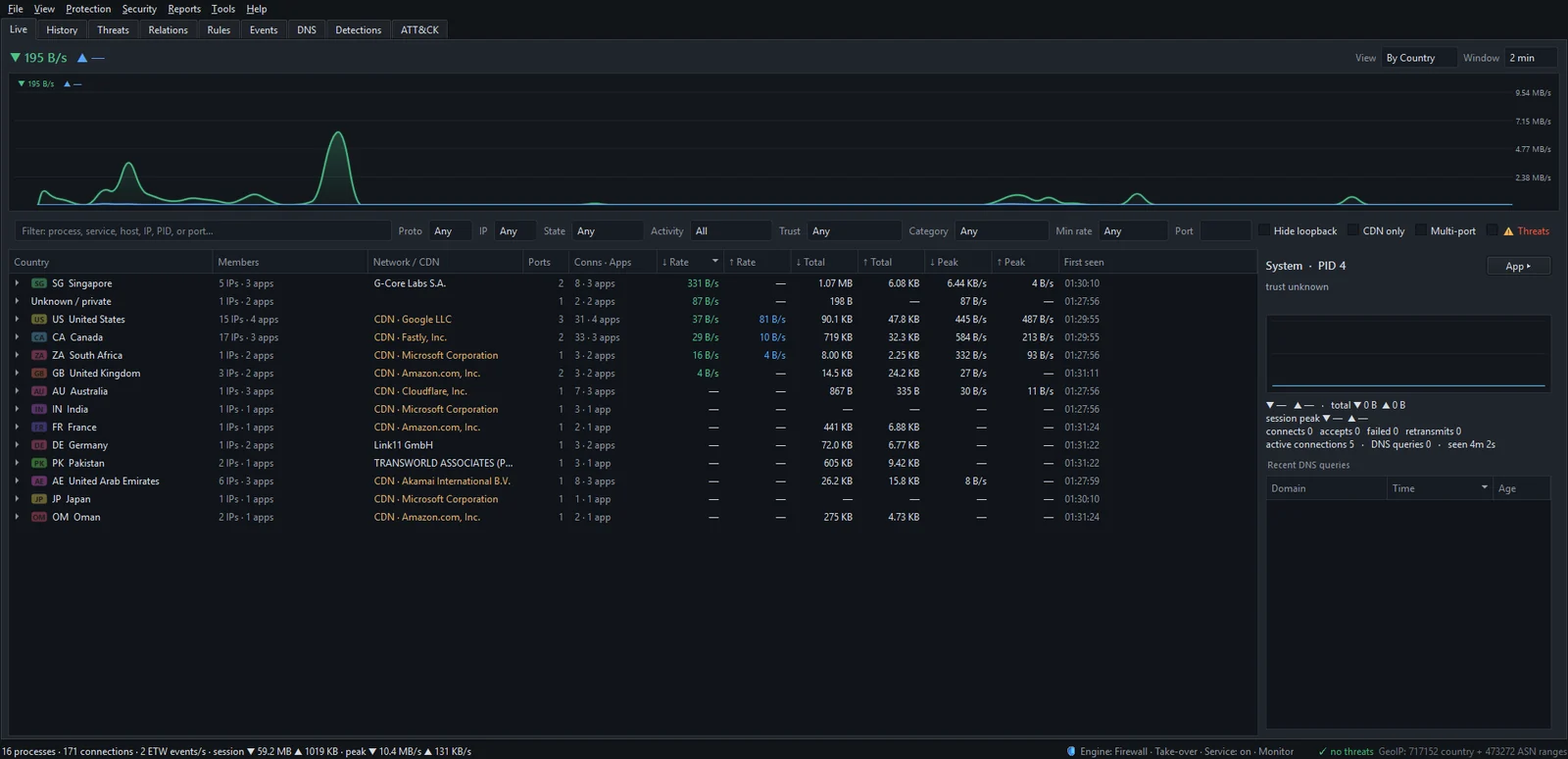
Don't read "a connection to a country I dislike" as "my data went there". It means an address registered there answered. Judge the program and the host name first; country is the weakest signal on the row.
Ordinary or worth investigating?
| Ordinary | Worth investigating |
|---|---|
| Browser · 443 · Established · Cloudflare · resolved name · megabytes | Unknown program in a temp folder · 443 · home broadband · no name · a few hundred bytes every minute |
| Many short connections while a page loads | One connection open for days, moving almost nothing |
| A big download from a name you recognize | A steady upload from a program with no reason to send anything |
The pattern that matters most is small, regular and unexplained. That's the shape of beaconing, and it's one of the behaviors NetSecWall's detection engine scores. To dig into one address, right-click the connection and choose Open IP dashboard.
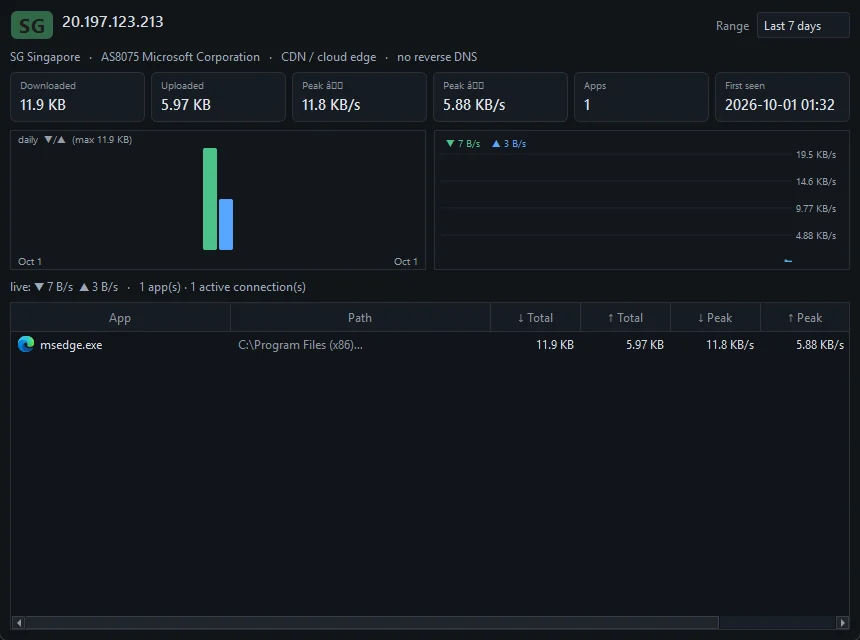
The dashboard shows every app that has used the address, which is often the fastest way to tell a shared CDN from something one program alone is talking to. More in the IP dashboard.
Frequently asked questions
Is a connection with no host name suspicious?
Mildly. Most legitimate services are reached by name, so a raw address with nothing behind it deserves an extra 30 seconds. Plenty of peer-to-peer and game traffic looks like that too.
Why does a service I use show up in a different country every day?
CDNs and cloud providers answer from whichever edge is nearest or least busy, and geolocation places each edge separately. The service didn't move; its front door did.
Can I look up an address on VirusTotal or WHOIS?
Yes. Right-click a connection and choose Investigate IP ▸, then VirusTotal, AbuseIPDB, IPinfo / WHOIS or Shodan. The site opens in your browser; NetSecWall doesn't look anything up on its own.
What's the difference between the remote host and the network owner?
The remote host is the name the program asked for, or the address's reverse DNS. The network owner is the company that runs the network the address belongs to, which for most websites is a CDN or cloud provider.