Newly registered domains: a quiet warning sign
Phishing and malware campaigns tend to use domains registered days earlier, before blocklists catch up. A very young domain proves nothing alone, but it adds weight when an app already looks wrong.
NetSecWall for Windows
On this page
Newly registered domains are names bought in the last few weeks. Phishing and malware operators lean on them because a fresh name has no bad reputation yet, while their older ones keep getting blocked, so a domain that's only days old is a quiet warning sign. It's only a sign: businesses, campaigns and projects register new domains every day, so age matters most when something else about the connection already looks wrong.
Why attackers use newly registered domains
- Reputation lags. Blocklists, browser warnings and email filters learn about a malicious domain after it has been used and reported. A brand-new one starts clean.
- Burn and replace. Once a domain is blocked it's worthless to the attacker, so they register the next one. Many malicious domains are used for days and then abandoned.
- Lookalikes on demand. A phishing campaign aimed at a bank or a delivery company needs a convincing name, registered just before the emails go out. MITRE ATT&CK lists buying domains as T1583.001 Acquire Infrastructure: Domains, under Resource Development.
- Some malware generates names. Families that use a domain generation algorithm compute a fresh list of names every day, and the operators register a few of them just in time.
Because of this, many security products and filtering DNS services treat newly registered domains as higher risk, and some block them outright for their first few weeks.
Why age alone is misleading
New domains are overwhelmingly ordinary: a new shop, a product launch, an event, a personal blog. Blocking or alarming on every one would be a mess.
Attackers also use old names:
- Hacked legitimate sites, which bring years of good reputation with them.
- Domains bought on the aftermarket. A name that changes hands without lapsing keeps its original registration date, and sometimes its reputation.
- Domains bought and left alone for months so they age before use.
- Subdomains on big platforms: free web hosts, dynamic DNS services and cloud providers, whose parent domain is old and trusted.
So domain age is a weak signal on its own and a useful one in combination.
How to check a domain's age yourself
Registration data is published through RDAP, the Registration Data Access Protocol, which has replaced WHOIS for generic top-level domains such as .com and .org. An RDAP lookup returns structured data including a "registration" event with a date. Many websites will do the lookup for you, and Microsoft's Sysinternals tools include a command-line whois.
Two caveats. Not every registry, especially some country-code ones, publishes a registration date this way. And a lookup tells the service which domain you're curious about.
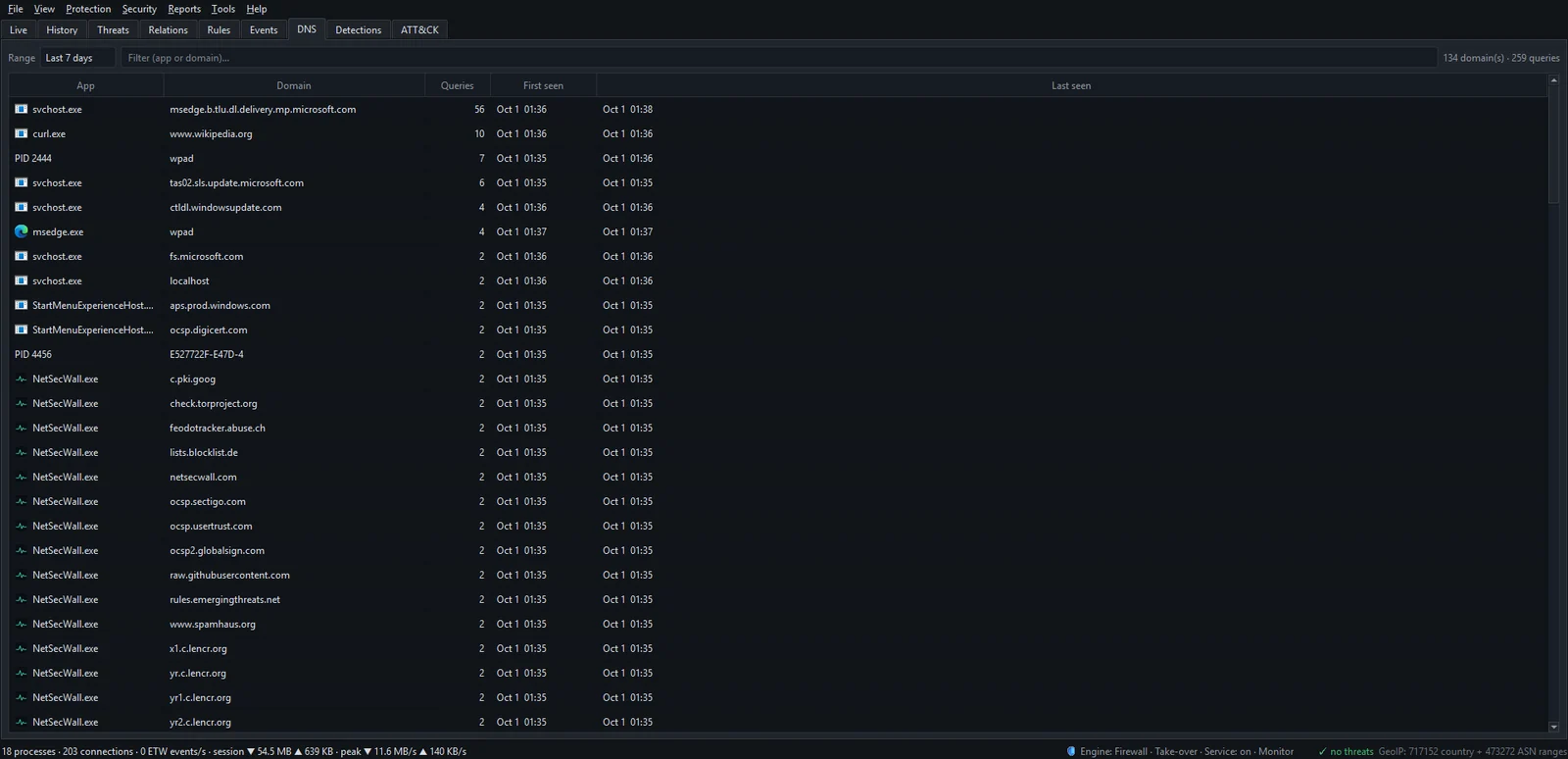
To know which domains to check, you need to see what your programs look up. The DNS tab in NetSecWall lists each program's lookups with query counts and first and last seen; what your DNS lookups reveal explains how to read it.
How NetSecWall uses domain age
NetSecWall has an optional check under Security ▸ Alerts & detection…, in the Newly-registered domains (NRD) box: Check the registration age of domains that flagged apps contact. It's off by default.
When it's on, the check is deliberately narrow:
- A program has to be flagged first: its risk score reaches 40 and it raises the "Suspicious process" alert, which is on by default. See what a risk score means.
- NetSecWall then takes up to five domains from that program's DNS log and reduces each to the registered name, so
login.example.co.ukbecomesexample.co.uk. - It asks an RDAP service for each name's registration date. The default is
https://rdap.org/domain/, and you can change it in the RDAP endpoint: field. - Any domain registered within the last 30 days raises a Newly-registered domain alert, "registered ~N day(s) ago — common for phishing / C2", recorded in the Events tab and mapped to ATT&CK T1568 Dynamic Resolution.

Why only flagged programs? Two reasons. It keeps the alert meaningful, since a young domain on its own is common. And it limits what leaves your PC.
Privacy: with this check on, the domain names a flagged program looked up are sent to a third-party RDAP service. Nothing else is sent, and nothing at all when the check is off, as it is by default.
The check is part of Threat intelligence, which is in the Plus, Family and Pro plans.
What to do with a young-domain alert
- Open the Detections tab to see why the program was flagged in the first place.
- Find the domain in the DNS tab: which program looked it up, how often, and since when.
- If the name imitates a brand you use, don't sign in to anything it led to. Go to the real site by typing its address yourself.
- Block the program with Block this app (firewall) while you investigate, and run a full antivirus scan.
- To stop every program reaching that domain, add it to a category that's set to block: open Protection ▸ Content categories…, select Scam / Phishing, add the domain and make sure Block is ticked for that category. Details in how to block a specific domain.
Domain blocks in NetSecWall work on the addresses the domain resolves to. That makes them reactive, since the first packets to a new address can get through, and a domain on a shared CDN address can over-block other sites.
What the check won't catch
- Most browsing. A browser visiting a phishing page usually isn't a flagged program, so its domains aren't checked. For web pages, rely on your browser's own protection, such as Microsoft Defender SmartScreen in Edge.
- Encrypted DNS. Lookups a browser makes over DNS-over-HTTPS don't appear in the DNS log; see encrypted DNS explained.
- Old or borrowed names, as described above.
- Registries without RDAP dates, and a few multi-part country suffixes where the registered name is worked out approximately.
- Everything beyond five domains for one program.
Domain age sits next to NetSecWall's address-based threat lists, which are strong on known-bad servers and blind to brand-new ones; what those lists catch and miss explains why the two complement each other. The 7-day trial includes both.
Frequently asked questions
What counts as a newly registered domain?
There's no fixed rule, but most security tools mean a domain registered within roughly the last 30 days. NetSecWall uses 30 days.
Should I block all newly registered domains?
Some filtering DNS services offer that, and it will occasionally break a legitimate new site. NetSecWall doesn't block by domain age; it uses age as extra evidence about a program that already looks suspicious.
Is RDAP the same as WHOIS?
RDAP is its successor. It returns the same kind of registration data in a structured, machine-readable format and is now the official source for generic top-level domains such as .com.
What does NetSecWall send when the NRD check is on?
Only the registered domain names from a flagged program's DNS log, up to five per program, to the RDAP service set in Settings. No traffic, history or personal details go with them.
Why didn't I get an alert for a phishing site I opened in my browser?
Because the check only runs for programs NetSecWall has already flagged, and a browser visiting one bad page usually isn't flagged. Your browser's own phishing protection is the right tool for web pages.
Keep reading
 Is my computer being tracked? What your network traffic says
Almost certainly, by ad and analytics services, which is normal and mostly happens in your browser. Signs of worse are specific: unknown programs, steady check-ins and flagged addresses.
Is my computer being tracked? What your network traffic says
Almost certainly, by ad and analytics services, which is normal and mostly happens in your browser. Signs of worse are specific: unknown programs, steady check-ins and flagged addresses.
 Why is an app on my PC talking to a Tor exit node?
Usually because something on your PC accepts connections arriving through Tor, a peer-to-peer app met a Tor user, or a program uses Tor itself. Malware does too, so check the app and direction.
Why is an app on my PC talking to a Tor exit node?
Usually because something on your PC accepts connections arriving through Tor, a peer-to-peer app met a Tor user, or a program uses Tor itself. Malware does too, so check the app and direction.
 Network visibility for a small office without an IT department
Watch three things on each PC: programs you don't recognize going online, unusually large uploads, and threat-list hits. Then add phone alerts and a 15-minute weekly review. No IT staff needed.
Network visibility for a small office without an IT department
Watch three things on each PC: programs you don't recognize going online, unusually large uploads, and threat-list hits. Then add phone alerts and a 15-minute weekly review. No IT staff needed.
 Threat-intelligence IP lists: what they catch and what they miss
Threat-intelligence IP lists name addresses already tied to botnets, hacked machines, spam networks or Tor. They catch known infrastructure well but miss new servers and can mislabel shared addresses.
Threat-intelligence IP lists: what they catch and what they miss
Threat-intelligence IP lists name addresses already tied to botnets, hacked machines, spam networks or Tor. They catch known infrastructure well but miss new servers and can mislabel shared addresses.