How to block a specific domain or website
Add the domain to a content category that is set to Block: Protection ▸ Content categories…, select the category, type the domain and click Add. Its subdomains are blocked too.
NetSecWall for WindowsOn this page
To block a specific domain in NetSecWall on Windows, add it to a content category that is set to Block: open Protection ▸ Content categories…, select the category, type the domain in the add box and click Add. The domain and all its subdomains are then blocked like the rest of that category — by the IP addresses they resolve to. This is the only way to block a particular domain; there is no URL or page-level blocking.
Block a specific domain step by step
- Open Protection ▸ Content categories… (enter the settings password if asked).
- Click the category you want to put the domain in. The next section helps you choose.
- In the box Add a domain to this category (e.g., tracker.example.com)…, type the domain, for example
example.com. - Click Add. The domain appears in the category's list marked (custom).
- Make sure Block is ticked for that category.
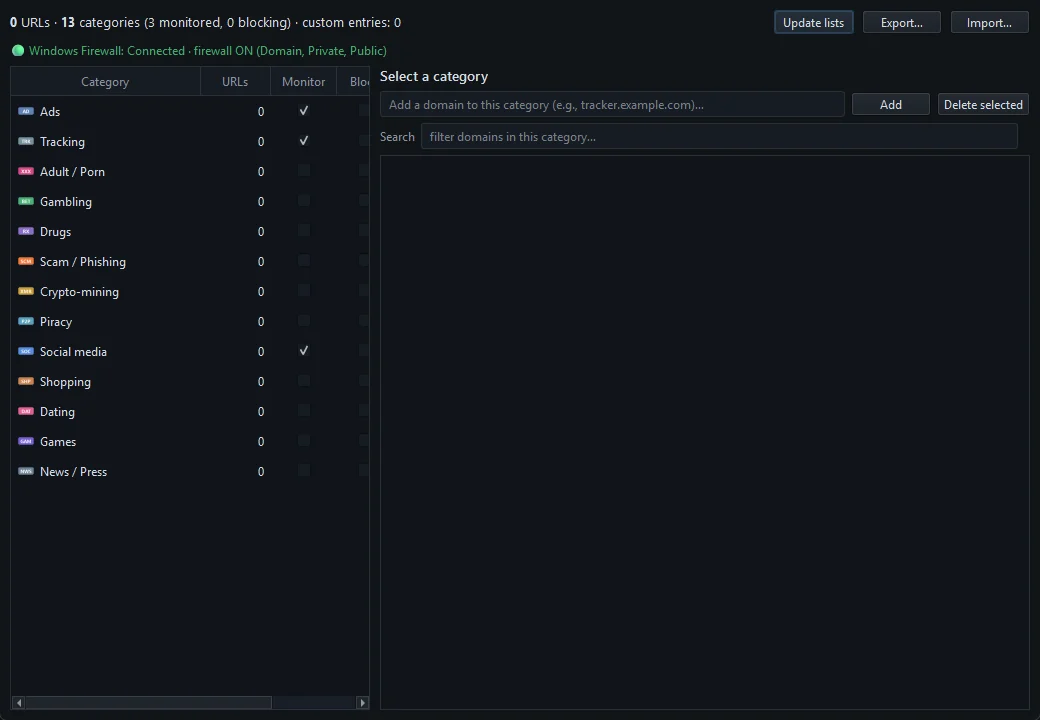
The block takes effect the next time a program on the PC looks the domain up.
Which category to put it in
There is no separate "custom" category, so the domain is blocked together with everything else in the category you choose. If that category isn't blocked yet, ticking Block blocks its whole list as well. So pick a category you already block, or one you are happy to block in full — Scam / Phishing is a natural home for a domain you distrust. A custom domain belongs to one category at a time; adding it to a second one moves it.
How the domain is matched
- Subdomains are included. Adding
example.comalso coverswww.example.com,mail.example.comand any other subdomain. - A subdomain doesn't cover its parent. Adding
ads.example.comblocks that name and names under it, but notexample.com. - Extras are stripped. A leading
www.is dropped, and if you paste a full URL, only the host name is kept. - A name needs a dot. Entries without one are ignored.
- No paths. You can't block
example.com/videoson its own. NetSecWall never sees URLs, so it is the whole domain or nothing.
How the block is enforced
A custom domain works exactly like the category lists. When a program looks the domain up through Windows, NetSecWall adds the public addresses it resolves to to its block rules. That has the same limits described in block website categories:
- The first packets to a brand-new address can get through before the block is in place.
- Other sites that share the same address, common on CDNs, are blocked too.
- A browser using its own encrypted DNS hides the lookup, so the block can be missed.
The DNS tab shows which domains each app actually looks up. It is the quickest way to find the exact name to block — for example, the one an app uses for its telemetry.
Custom domains survive list updates
Your own domains are stored separately from the downloaded lists, so Update lists and the daily refresh never remove them. To back them up or copy them to another PC, click Export… in the Content categories window (or File ▸ Export settings…); Import… loads such a file and replaces your current category settings and custom domains.
Remove a domain, or make an exception
Select the domain in the category's list and click Delete selected. A custom domain is simply removed. A domain that came from a downloaded list becomes an exception: NetSecWall stops treating it as part of that category, which is how you unblock a site the lists caught by mistake.
Block an address instead
If the site always uses the same fixed address, you can block that address with a custom firewall rule (Remote addresses). Most large sites change addresses and share them with others, so the domain method above is usually the better fit.
Frequently asked questions
Can I block a single page instead of a whole website?
No. NetSecWall doesn't see URLs or page contents. It blocks whole domains, by the IP addresses they resolve to.
Does blocking example.com also block its subdomains?
Yes. A custom domain covers every name under it, so www.example.com and mail.example.com are blocked too.
Will my custom domains disappear when the lists update?
No. They are stored separately from the downloaded lists and are kept through every update.
Can I block one domain without blocking a whole category?
Not directly, because a custom domain always rides along with the category it's in. Put it in a category you already block, or in one you're happy to block in full, such as Scam / Phishing.